The -m string is for a future you. Say what changed.
In the terminal the shape is:
git commit -m"a short sentence about what this snapshot is"
Prefer a verb and an object: what you added or changed
Avoid empty messages and vague ones like update or fix
First commit: the bare script
Check, then commit the JSON-printing script. Suggested message: Add Open Library search that prints raw JSON.
git status
In the terminal:
git status
→
On branch main
Your branch is up to date with 'origin/main'.

Untracked files:
  (use "git add <file>..." to include in what will be committed)
    01-search.py

nothing added to commit but untracked files present
Untracked: Git sees 01-search.py on disk in your working folder, but is not recording it yet.
git diff
In the terminal:
git diff
→
(no output)
Diff: the line-by-line change list between your working folder and the last commit. Untracked files have nothing to compare yet, so git diff stays empty until you stage.
git add
In the terminal:
git add 01-search.py
→
(no output)
No text is normal. Run git status again if you want to see it staged in green.
Staged: you marked this version of 01-search.py for the next commit. Unstaged means the opposite: changes still only in the working folder, not on that list.
git commit -m
In the terminal:
git commit -m"Add Open Library search that prints raw JSON"
→
[main 3f8a2c1] Add Open Library search that prints raw JSON
 1 file changed, 12 insertions(+)
 create mode 100644 01-search.py
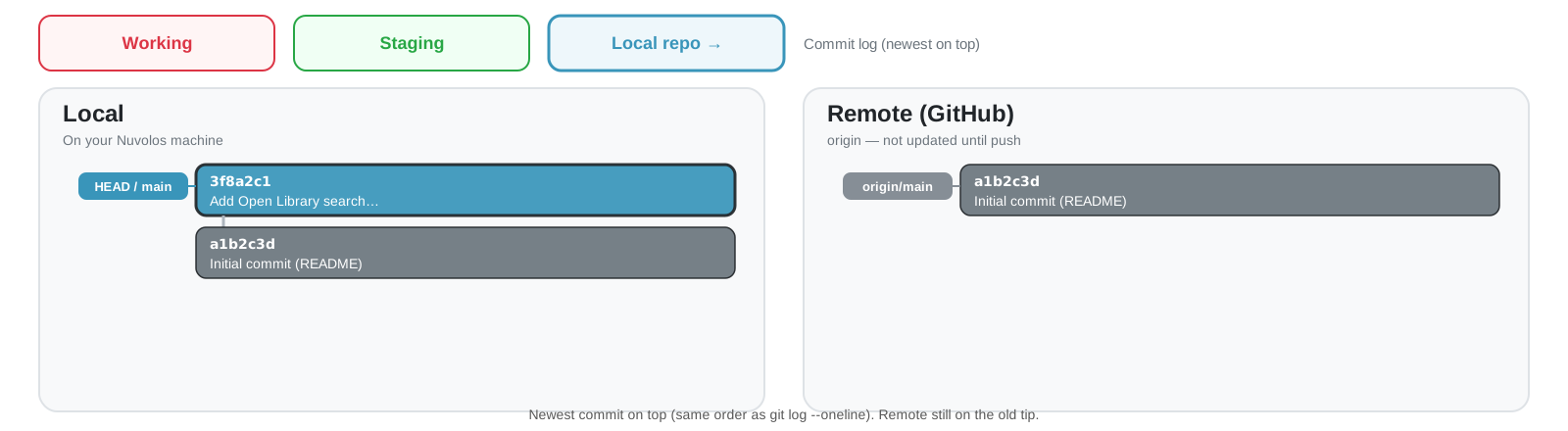
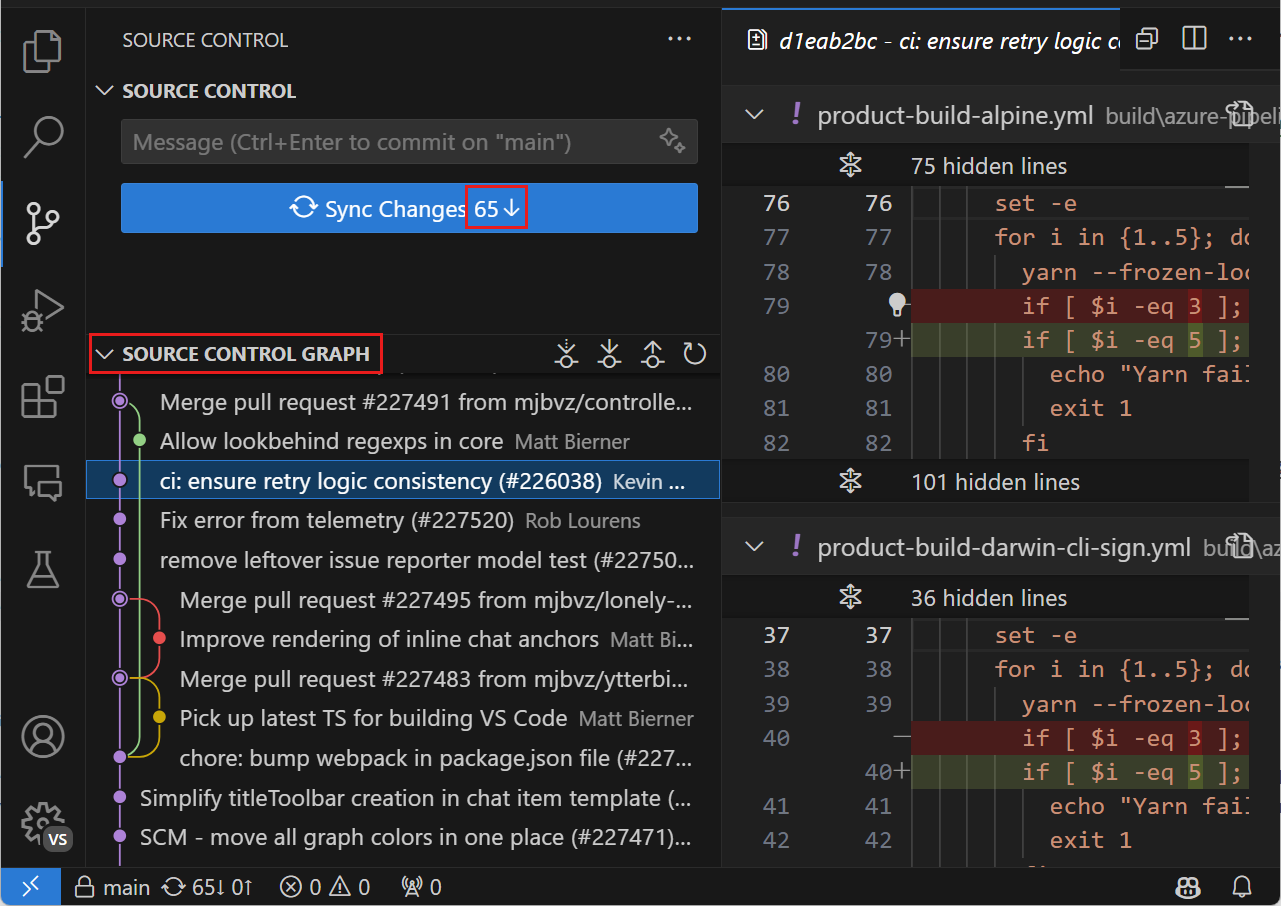
Committed locally: a new box on top of your local pile (newest on top). Remote unchanged:origin/main still points at the earlier tip.
Check with git log and git status
Same story in the terminal. Newest line first in git log. Status says you are ahead of the remote.
In the terminal:
git log --oneline
3f8a2c1 Add Open Library search that prints raw JSON
a1b2c3d Initial commit (README)
In the terminal:
git status
On branch main
Your branch is ahead of 'origin/main' by 1 commit.
nothing to commit, working tree clean
Make the print readable
Now change the script. Print a few fields instead of the whole JSON.
In the editor, replace the print(json.dumps(...)) line with:
for doc in payload["docs"]: title = doc["title"]if"author_name"in doc: author = doc["author_name"][0]else: author ="(no author)"if"first_publish_year"in doc: year = doc["first_publish_year"]else: year ="?"print(f"{title} | {author} | {year}")
Each doc is a dictionary for one book.
doc["title"] is ordinary dictionary lookup.
Some books omit author_name or first_publish_year. Ask with "author_name" in doc before you read that key. If it is missing, use a placeholder string in the else branch.
Run it again
In the terminal:
python 01-search.py
Example of a successful run:
Ada Lovelace | Isabel Sanchez Vegara | 2018
Ada Lovelace | Christopher Hollings | 2018
Enchantress of numbers | Jennifer Chiaverini | 2017
Second commit: the readable print
Commit the print change as its own snapshot. Suggested message: Print title, author, and year from search results.
git status (again)
In the terminal:
git status
→
On branch main
Your branch is ahead of 'origin/main' by 1 commit.

Changes not staged for commit:
  (use "git add <file>..." to update what will be committed)
    modified:   01-search.py

no changes added to commit
Modified (unstaged):01-search.py is tracked, but your edits sit only in the working folder. They are not staged for the next commit yet.
git diff (again)
In the terminal:
git diff
→
diff --git a/01-search.py b/01-search.py
--- a/01-search.py
+++ b/01-search.py
@@ -8,4 +8,18 @@
payload = response.json()
-print(json.dumps(payload, indent=2))+for doc in payload["docs"]:+ title = doc["title"]++ if "author_name" in doc:+ author = doc["author_name"][0]+ else:+ author = "(no author)"++ if "first_publish_year" in doc:+ year = doc["first_publish_year"]+ else:+ year = "?"++ print(f"{title} | {author} | {year}")
git diff now lists those unstaged edits: red lines left the last commit, green lines are in your working folder.
git add (again)
In the terminal:
git add 01-search.py
→
(no output)
git add copies the current working version into the staging area. The file is now staged for the next commit.
Keep editing after git add
Staging is a snapshot. Edit again before you commit and the new edits stay only in the working folder.
In the editor, change one more thing (for example the query string):
# Change to another name then savequery ="Ada Lovelace"
You still have the earlier print-loop version staged.
The new query edit is unstaged.
git status (staged and unstaged)
In the terminal:
git status
→
On branch main
Your branch is ahead of 'origin/main' by 1 commit.

Changes to be committed:
  (use "git restore --staged <file>..." to unstage)
    modified:   01-search.py

Changes not staged for commit:
  (use "git add <file>..." to update what will be committed)
    modified:   01-search.py
Same filename, two places: green = staged snapshot, red = newer working edits not staged yet. git diff shows the unstaged part. git diff --staged shows what the next commit would include.
git add once more, then commit
If you want the newer edit in this commit too, stage again. Then commit.
In the terminal:
git add 01-search.pygit commit -m"Print title, author, and year from search results"
After the second git add, working and staging match again.
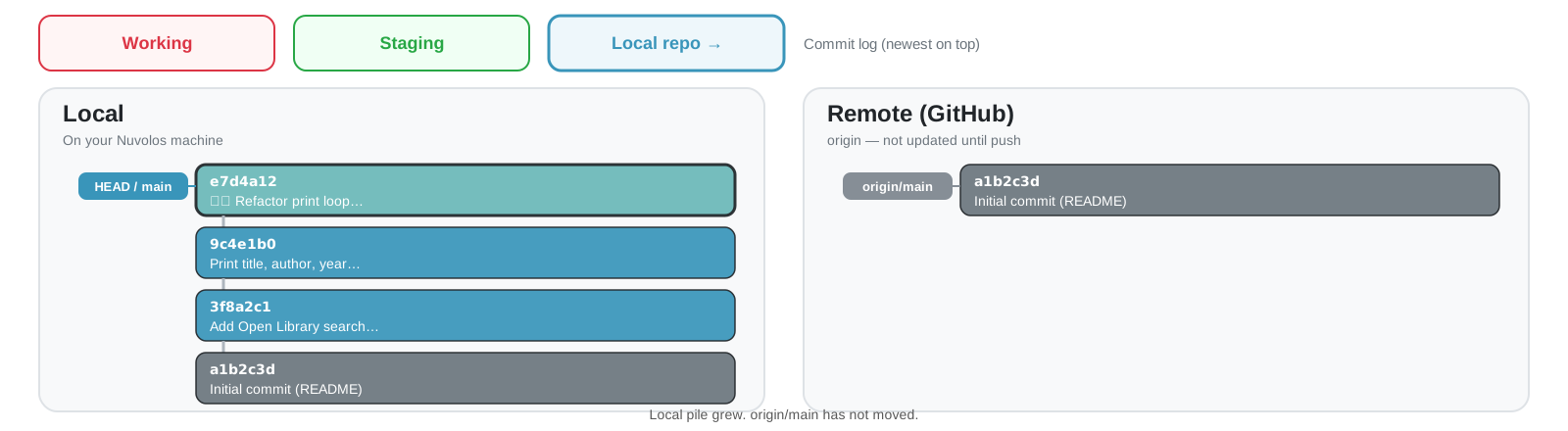
Local pile grows with each commit. Remote still on the old tip until you push.
A shorter version
Here is a shorter version of the same loop. Next slides step through each new idea.
for doc in payload["docs"]: title = doc.get("title", "(no title)") authors = doc.get("author_name") or [] author = authors[0] if authors else"(no author)" year = doc.get("first_publish_year", "?")print(f"{title} | {author} | {year}")
.get with a default
for doc in payload["docs"]: title = doc.get("title", "(no title)") authors = doc.get("author_name") or [] author = authors[0] if authors else"(no author)" year = doc.get("first_publish_year", "?")print(f"{title} | {author} | {year}")
Looks up the key. Uses the second argument if the key is missing.
Same as:
if"title"in doc: title = doc["title"]else: title ="(no title)"
or []
for doc in payload["docs"]: title = doc.get("title", "(no title)") authors = doc.get("author_name") or [] author = authors[0] if authors else"(no author)" year = doc.get("first_publish_year", "?")print(f"{title} | {author} | {year}")
If the key is missing, .get returns None. or [] turns that into an empty list.
for doc in payload["docs"]: title = doc.get("title", "(no title)") authors = doc.get("author_name") or [] author = authors[0] if authors else"(no author)" year = doc.get("first_publish_year", "?")print(f"{title} | {author} | {year}")
Take the first author when the list is non-empty, otherwise the placeholder.
Same as:
if authors: author = authors[0]else: author ="(no author)"
Commit the refactor
git add 01-search.pygit commit -m"♻️ Refactor print loop to use dict.get"
Yes, commit messages are UTF-8 and accept emojis. Check out gitmoji (♻️ means refactor code).
The local pile grows again. origin/main still has not moved.
Push your commits
Your local machine is ahead. The remote on GitHub still points at the old tip.
Local pile grew. origin/main has not moved.
git push
In the terminal:
git push
→
Enumerating objects: 8, done.
Writing objects: 100% (6/6), done.
To github.com:YOU/me204-git-practice.git
   a1b2c3d..e7d4a12  main -> main
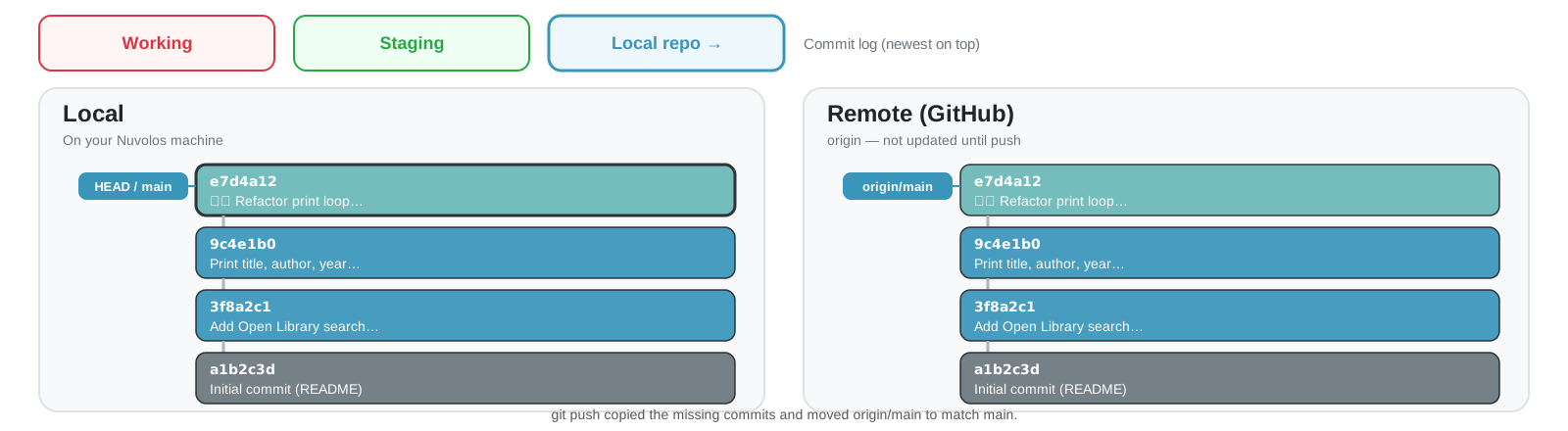
git push sends the commits GitHub does not have yet.
After the push
origin/main now matches main. Both piles share the same top box.
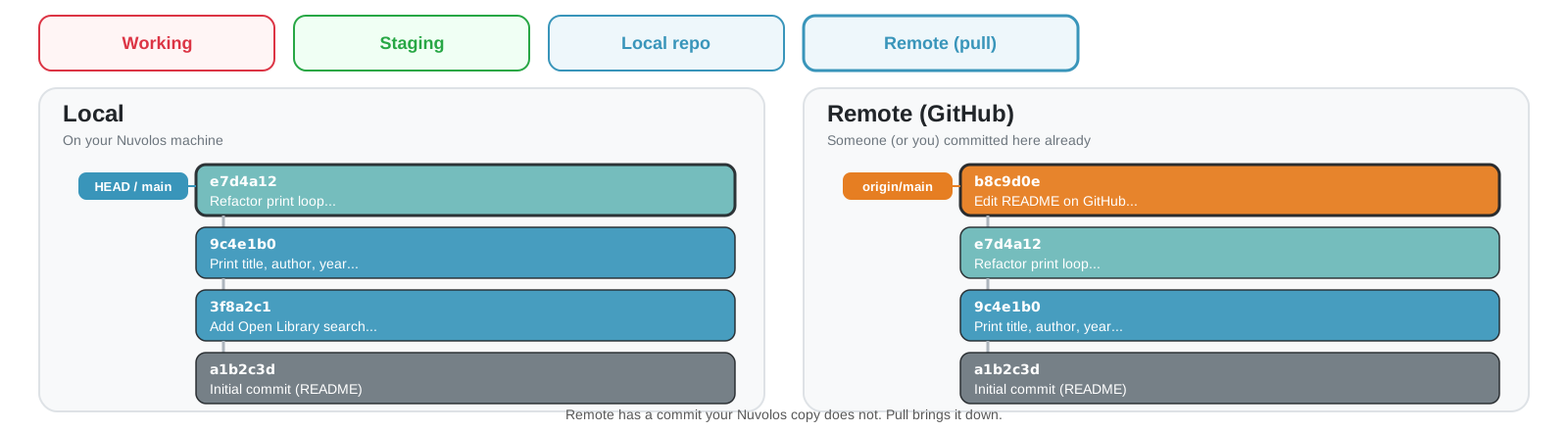
When the remote moved
What if you edit the README on github.com? Or push from your laptop? Or a classmate pushes first?
Your Nuvolos copy is behind. git push will refuse until you catch up.
First git pull may stop and ask
The first time Git has to join histories, it asks how: merge or rebase. For this course, choose merge.
hint: You have divergent branches and need to specify how to reconcile them.
hint:   git config pull.rebase false  # merge
hint:   git config pull.rebase true   # rebase
hint:   git config pull.ff only       # fast-forward only
In the terminal (once per machine is enough):
git config --global pull.rebase false
That sets merge as the default for every repo on this machine. Do not pick rebase today.
git pull downloads the commits you are missing and updates your local main. This afternoon’s lab uses pull when someone else pushed first.
Useful commands that only look
These leave your files alone. They only print history or diffs.
In the terminal:
git log --onelinegit log --oneline--graph--allgit show HEADgit diff --staged
git diff --staged compares what you staged to the last commit.
Undo with the buckets
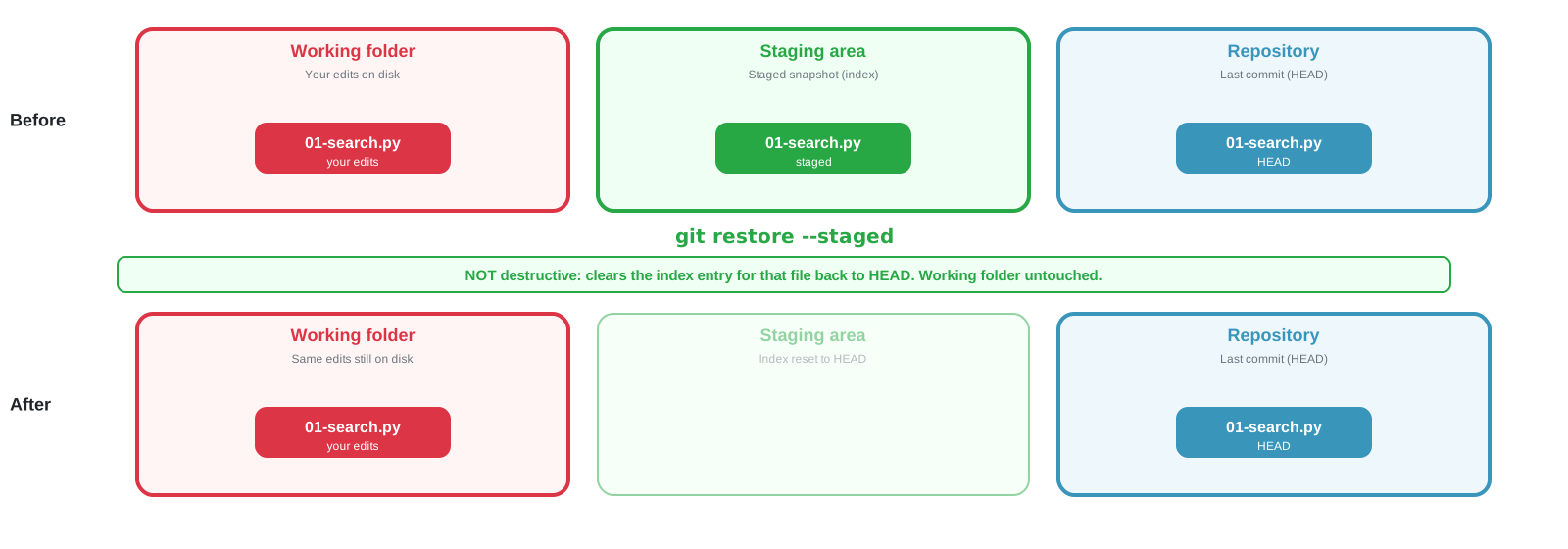
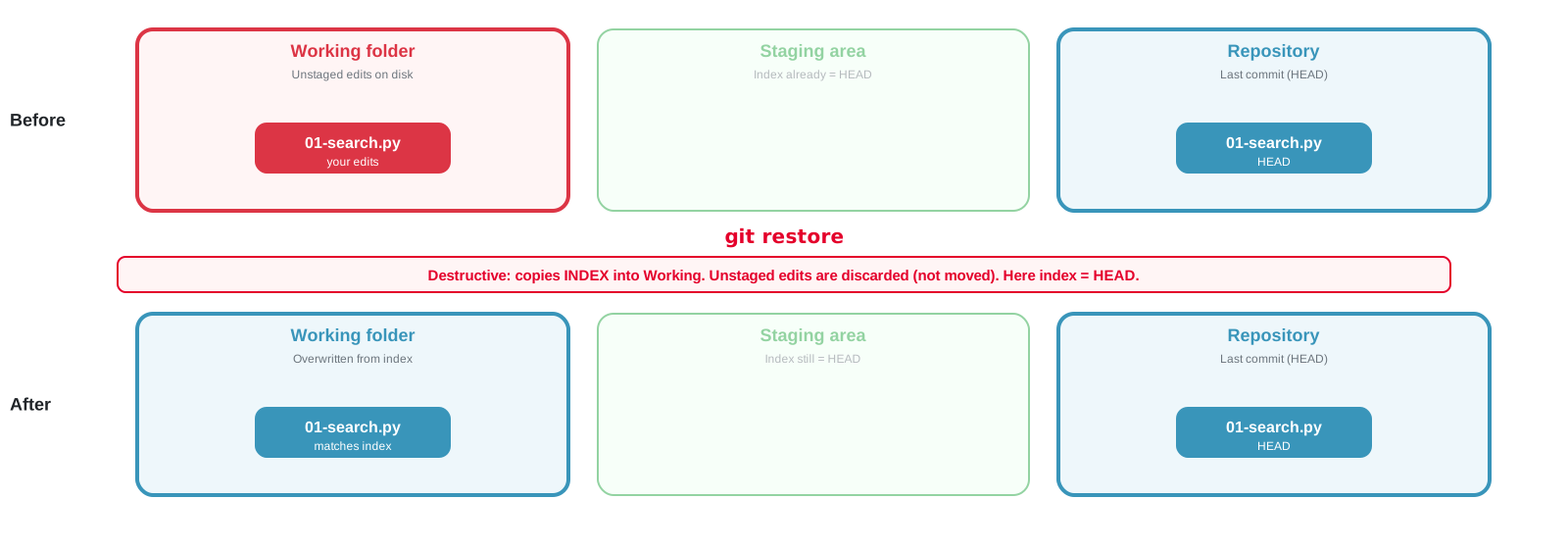
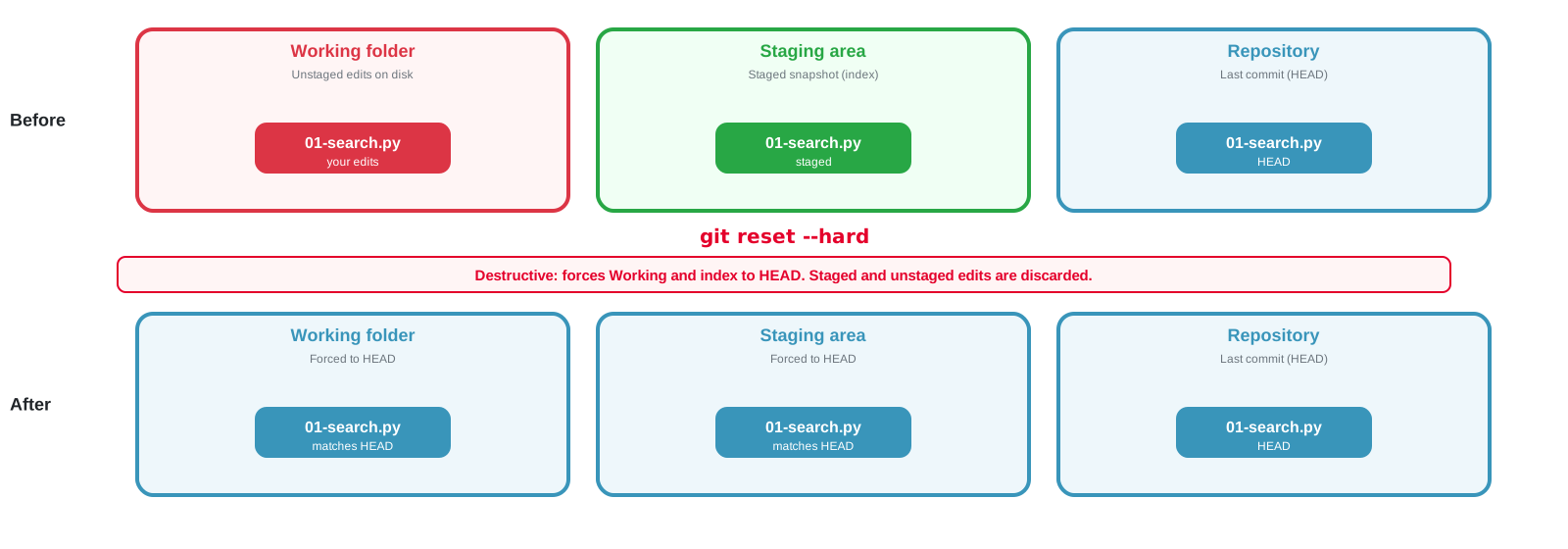
Same three buckets. Before vs After. restore --staged is safe. Bare restore and reset --hard discard work.
git restore --staged
Safe. Resets the index for that file back to HEAD. The working folder is not rewritten.
In the terminal:
git restore --staged 01-search.py
git restore without --staged
Destructive: copies the index into the working folder. Unstaged edits on disk are discarded. They do not move into the index as a staged snapshot. When nothing is staged, the index already matches HEAD, so the file ends up matching the last commit.
In the terminal:
git restore 01-search.py
git reset --hard
Also destructive. Forces both the working folder and the index to HEAD. Staged and unstaged edits are discarded.
In the terminal:
git reset --hard
If you only meant to unstage, use git restore --staged. Do not run reset --hard today.
☕ Coffee Break
11:20 – 11:35
After the break:
Branches and a manual merge
Same moves in VS Code
docs/index.md and GitHub Pages
3️⃣ Branches, Then Merge
11:35 – 12:15
How to try an edit without changing main yet
Create and switch
In the terminal:
git branchgit switch -c improve-readme
git branch lists names. git switch -c creates improve-readme and moves you onto it.
Change something on the branch
Edit README.md while you are on improve-readme. Commit there. Stay on this branch until the next slide.
Wait a minute, then open https://<user>.github.io/<repo>/
Check the published URL
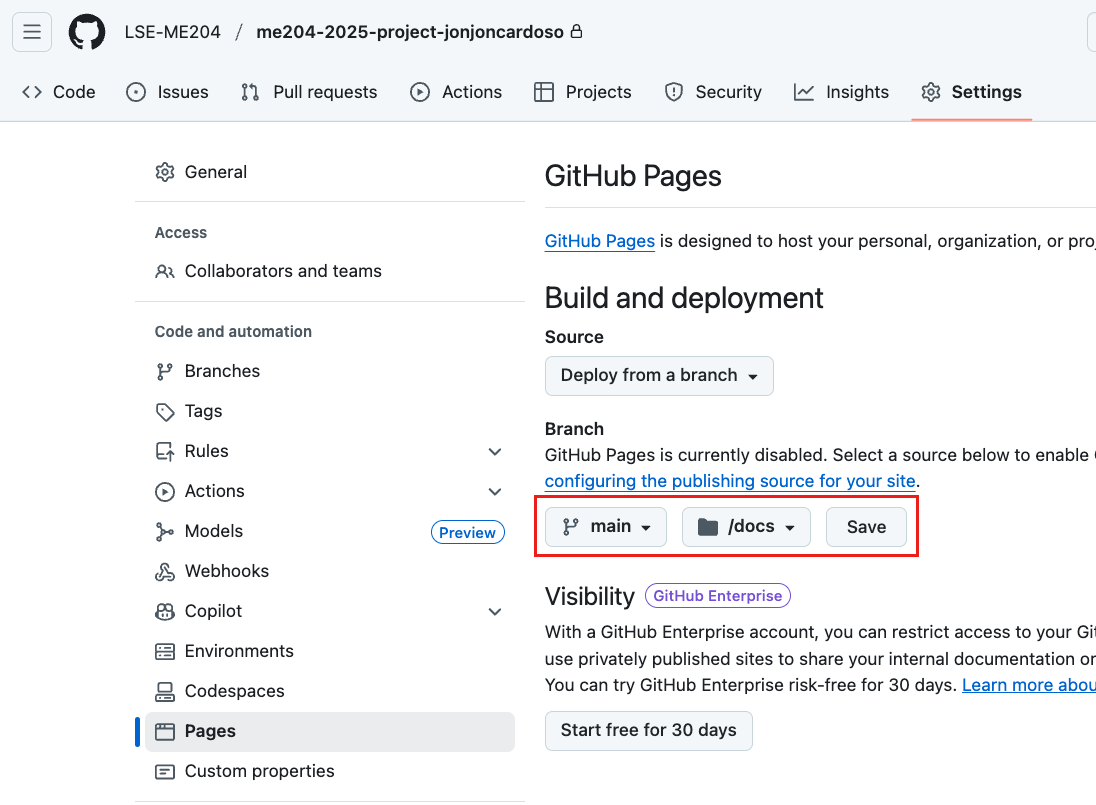
If the URL 404s, check folder /docs, branch main, and wait for the Pages build. Public repos work on the free plan. Private Pages needs a paid GitHub plan.