LSE ME204 · Data Engineering Principles for the Social Sciences
🖥️ Week 01 Day 03 Lecture
Collecting Data from the Web (APIs) with Python

1️⃣ ONS Data Sources and File Downloads
10:00 – 10:30
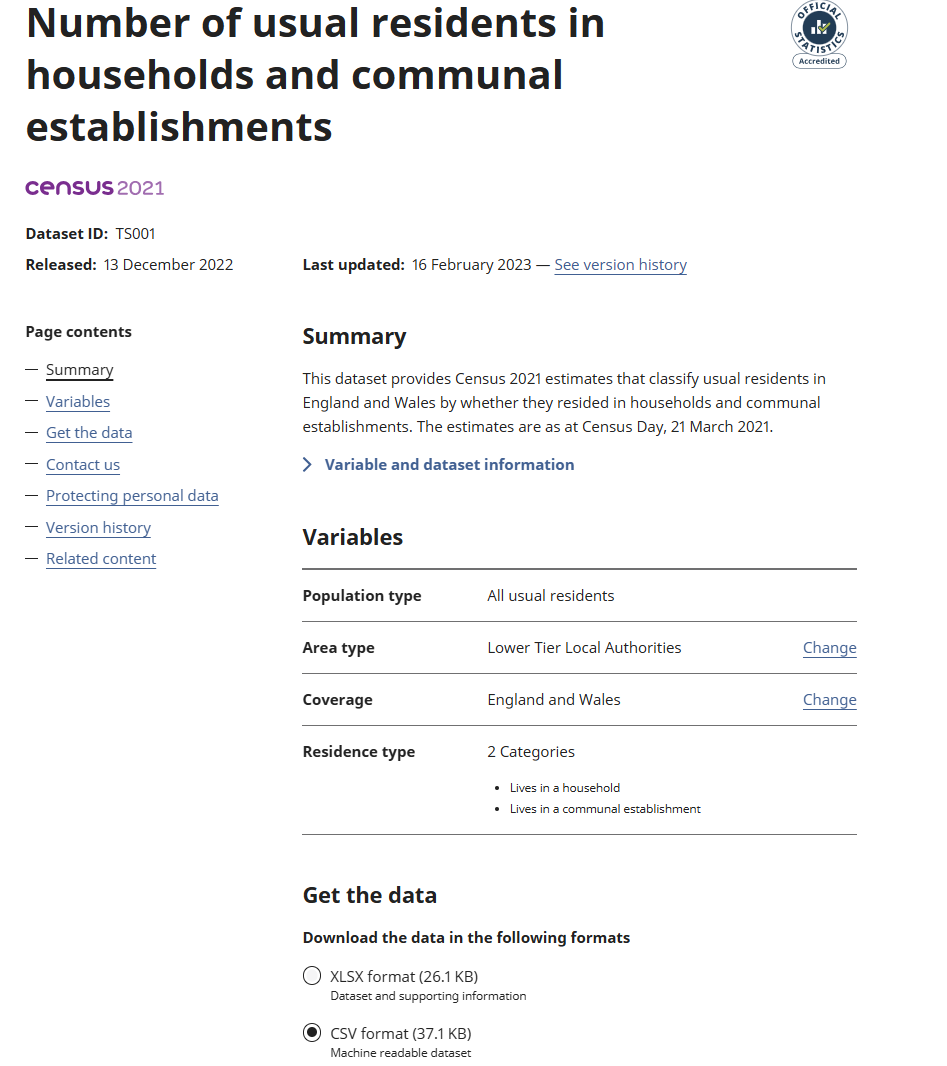
The CSV file you used yesterday in the lab, data/london_boroughs.csv, came from the ONS Census 2021 dataset TS001. Let’s see how you would download it yourself.
ONS Census Dataset TS001
Office for National Statistics (ONS)
- The United Kingdom’s national statistical institute
- Publishes official statistics about the population, economy, and society
- Runs the census for England and Wales
Dataset reference TS001
TSmeans Topic SummaryTS001is the reference code assigned to this table- Title: Number of usual residents in households and communal establishments
- Census date: 21 March 2021
Download the CSV with curl
Say you have the actual address where the CSV file is stored on the website:
I’ll get back to how shortly. Official documentation: curl manual, --location, and --output.
https://static.ons.gov.uk/datasets/TS001-2021-3.csvYou can give that address to curl and choose the name of the local copy:
--locationfollows another address if the website redirects the download.--outputchooses the name of the saved file.
The \ at the end of a line tells the terminal the command continues on the next line. You can type it as one long line instead.
The browser and curl can download the same file. Run curl --help in the terminal to see all options.
2️⃣ HTTP Requests in the Terminal and Python
10:30 – 11:00
The browser and curl both asked an ONS server for the CSV file. On the web, that exchange follows a set of rules called HTTP.
HTTP Requests and Responses
HTTP stands for Hypertext Transfer Protocol.
- Hypertext means documents with links. Tim Berners-Lee proposed the idea at CERN in 1989: pages that point to other pages.
- Transfer means moving those documents between computers.
- Protocol means agreed rules for the exchange.
HTTP defines how a client and server exchange messages on the web.
Tim Berners-Lee proposed hypertext for the web at CERN in 1989. He spoke at LSE in 2023 (recording).
Reference: MDN, HTTP messages.
The ONS Download in the Network Panel
A browser records its HTTP requests and responses under Developer Tools > Network.
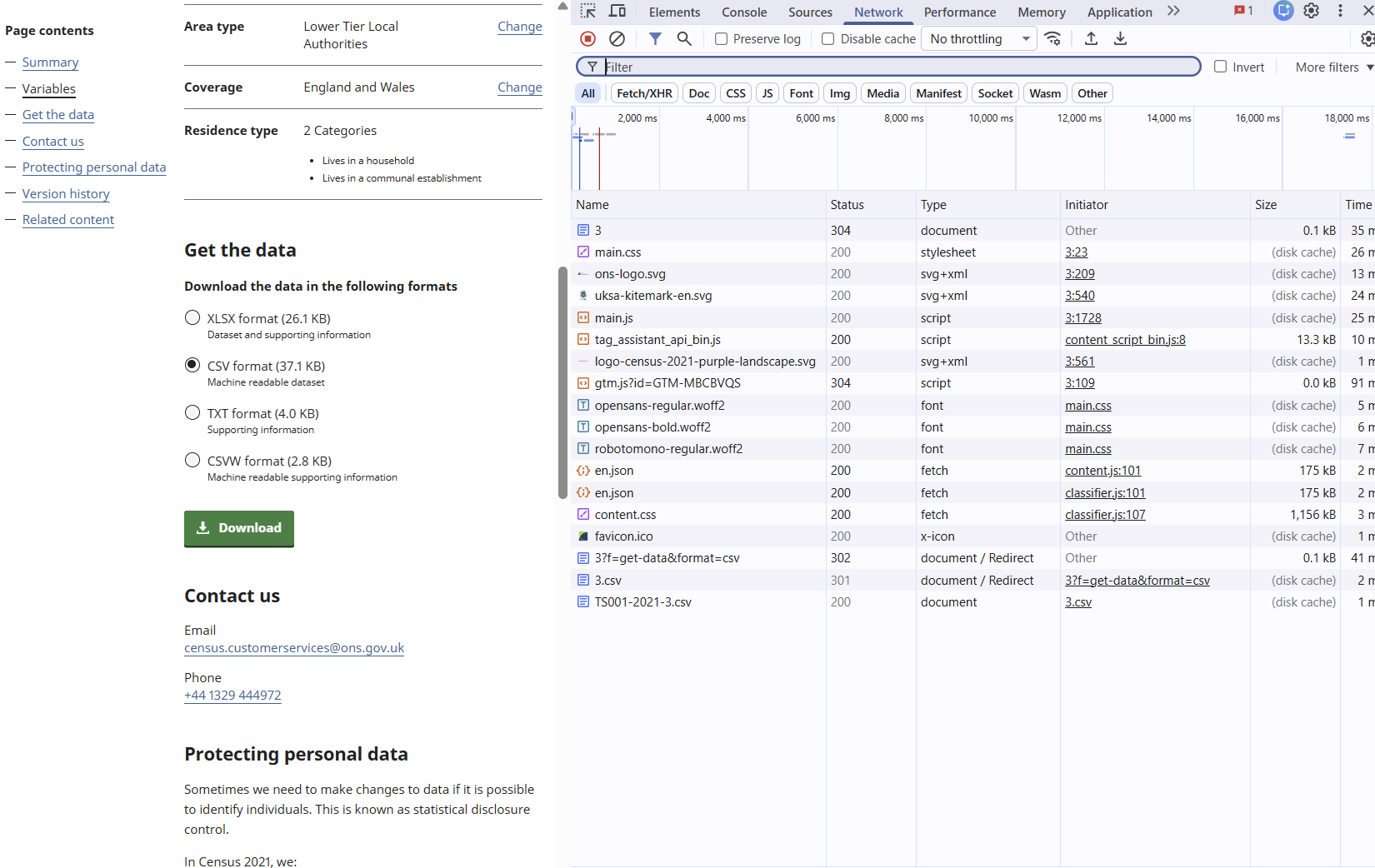
One click on Download produced three requests and three responses.
Official documentation: Chrome DevTools, Inspect network activity.
The ONS Download Sequence
curl --location follows those redirects until it receives the CSV.
References: MDN, HTTP response status codes and Everything curl, Redirects.
Python’s Requests Library
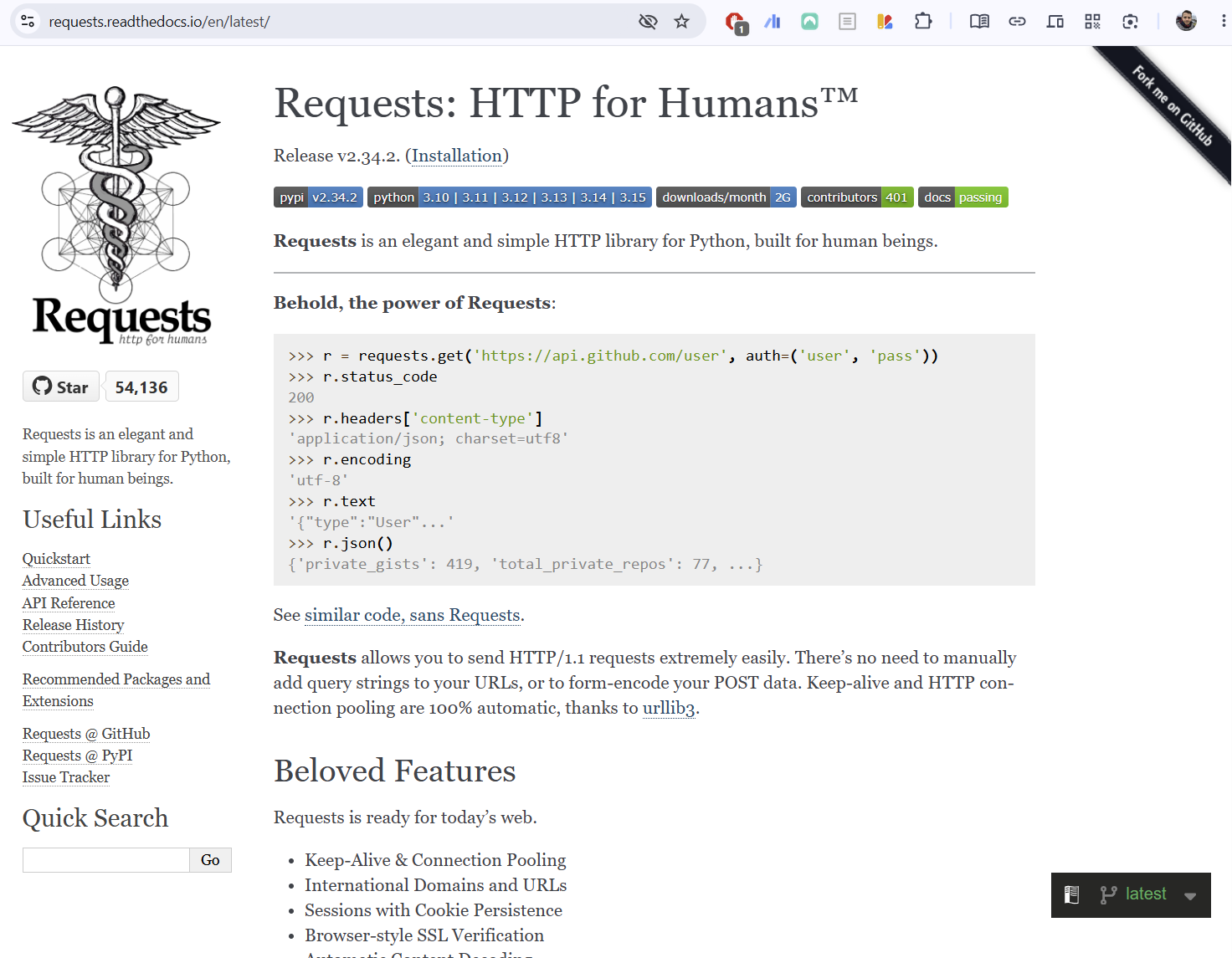
Python comes with a standard library: modules installed as part of Python itself.
Requests is a third-party library. It is developed and released separately from Python, so it must be installed before a program can import it.
Requests is installed on the Linux computer you have on Nuvolos.
This line makes the installed library available inside your program.
Official documentation: Python standard library and Requests.
HTTP Requests with curl and requests
Both tools received the same response content. curl writes it to standard output; Python keeps a response object in memory until we inspect or save it.
In Python
Response content written to the terminal:
Lower Tier Local Authorities Code,...,Observation
E06000001,Hartlepool,1,Lives in a household,91471
Response content printed from memory:
Lower Tier Local Authorities Code,...,Observation
E06000001,Hartlepool,1,Lives in a household,91471
Official documentation: Requests, Quickstart.
Request and Response Headers
Headers are key-value metadata sent with an HTTP request or response. Request headers describe the client and what it can accept. Response headers describe the returned content.
In Python
Selected lines (> request, < response):
> GET /datasets/TS001-2021-3.csv HTTP/2
> Host: static.ons.gov.uk
> User-Agent: curl/...
< HTTP/2 200
< content-type: binary/octet-stream
< content-length: 37995
Selected values:
python-requests/...
binary/octet-stream
37995
References: MDN, HTTP headers, curl --verbose, and Requests, Response headers.
Check the Response Status
200200
Success
The server returned the requested content.
301 / 302
Redirect
The client should send another request to a different address.
404
Not found
The server could not find the requested address.
raise_for_status() stops the program for unsuccessful 4xx or 5xx responses.
References: Requests, Response status codes and MDN, HTTP response status codes.
🔍 Your turn: what would you type?
The London Datastore publishes a spreadsheet of daily Santander Cycle Hire counts since 2010:
You want to save this file as cycle-hires.xlsx. What do you type in the terminal?
An XLSX file stores spreadsheet data as compressed XML inside a ZIP archive. Unlike CSV, it can hold formatting, formulas, and multiple sheets. cat cannot read it because the bytes are not plain text, but curl downloads it the same way it downloads a CSV.
The full HTTP status code reference is in the appendix slides at the end of this deck.
Inspect the Response Text
Step by step
What type is the response body?
strWhat does the first line say?
Lower Tier Local Authorities Code,...,ObservationThe first line is the CSV header you saw in W01D02.
Official documentation: Requests, Response content.
Save the CSV with curl and Python
Both commands create the same local file: TS001-2021-3.csv.
In the terminal
--output writes the response content to the named file.
3️⃣ REST APIs, Endpoints, and Parameters
11:00 – 11:15
Let’s talk about weather. On Monday, Open-Meteo supplied the data behind our heatwave demonstration. We will now inspect how a client asks Open-Meteo for weather data.
One Browser, Two Kinds of Page
🌐 A webpage for people
Open-Meteo Forecast API documentation
- The server returns HTML.
- The browser renders headings, forms, and links.
- We use the page to learn what requests the service accepts.
{} An API endpoint
Open a London rainfall request for three days
- The server returns JSON.
- The browser displays that JSON as text.
curland Python can request the same address.
All three tools send the same HTTP request. The difference is what they do with the response: the browser renders HTML as a page and displays JSON as text.
Official documentation: Open-Meteo Forecast API and MDN, API.
API and REST
API stands for Application Programming Interface. It defines how one piece of software can request data or actions from another.
REST stands for Representational State Transfer. For our work, a REST API means:
- a resource has an endpoint, which is its URL
- the client sends an HTTP method such as
GET - parameters specify the requested place, variable, and time span
- the server returns a representation of the resource, usually JSON
- each request contains what the server needs to handle that request
REST describes the request pattern. It does not name a different kind of client.
Open-Meteo Endpoint and Parameters
The endpoint (the base address):
https://api.open-meteo.com/v1/forecastThe query string (after the ?, joined by &):
?latitude=51.5085&longitude=-0.1257&daily=rain_sum
 &timezone=Europe/London&forecast_days=3
Everything before ? is the endpoint. Everything after is a query parameter, joined by &.
| Parameter | Value | Asks for |
|---|---|---|
latitude |
51.5085 |
London’s latitude |
longitude |
-0.1257 |
London’s longitude |
daily |
rain_sum |
daily rainfall total |
timezone |
Europe/London |
dates in London time |
forecast_days |
3 |
three forecast days |
Open-Meteo does not require an API key for this classroom request. Some APIs require authentication, which we will handle when a task needs it.
Official documentation: Open-Meteo Forecast API parameters.
The Same Request in a Browser and curl
In a browser:
https://api.open-meteo.com/v1/forecast?latitude=51.5085&longitude=-0.1257&daily=rain_sum&timezone=Europe%2FLondon&forecast_days=3In the terminal:
Both clients receive the same JSON shape:
Official documentation: Open-Meteo Forecast API and curl manual.
🔍 Historical Weather vs Historical Forecast
(Activity)
11:15 – 11:30
Open-Meteo publishes two historical endpoints: one for reanalysis1 data, one for old forecasts. Can you find both endpoints in the docs and build a request for each?
Find the endpoint, build the URL, compare
In groups of 3–4. Open open-meteo.com/en/docs and look at the sidebar.
 Pair A
Find the Historical Weather API.
Pair B
Find the Historical Forecast API.
Both pairs: build a request for London (
51.5085,-0.1257), dailytemperature_2m_maxandtemperature_2m_min, 1–14 July 2025.Compare what the two endpoints returned. Same numbers or different?
(Eyeballing it is fine)
The two endpoints serve different data products for the same location and period. Historical Weather returns reanalysis (a model fitted to observations). Historical Forecast returns what the forecast said at the time.
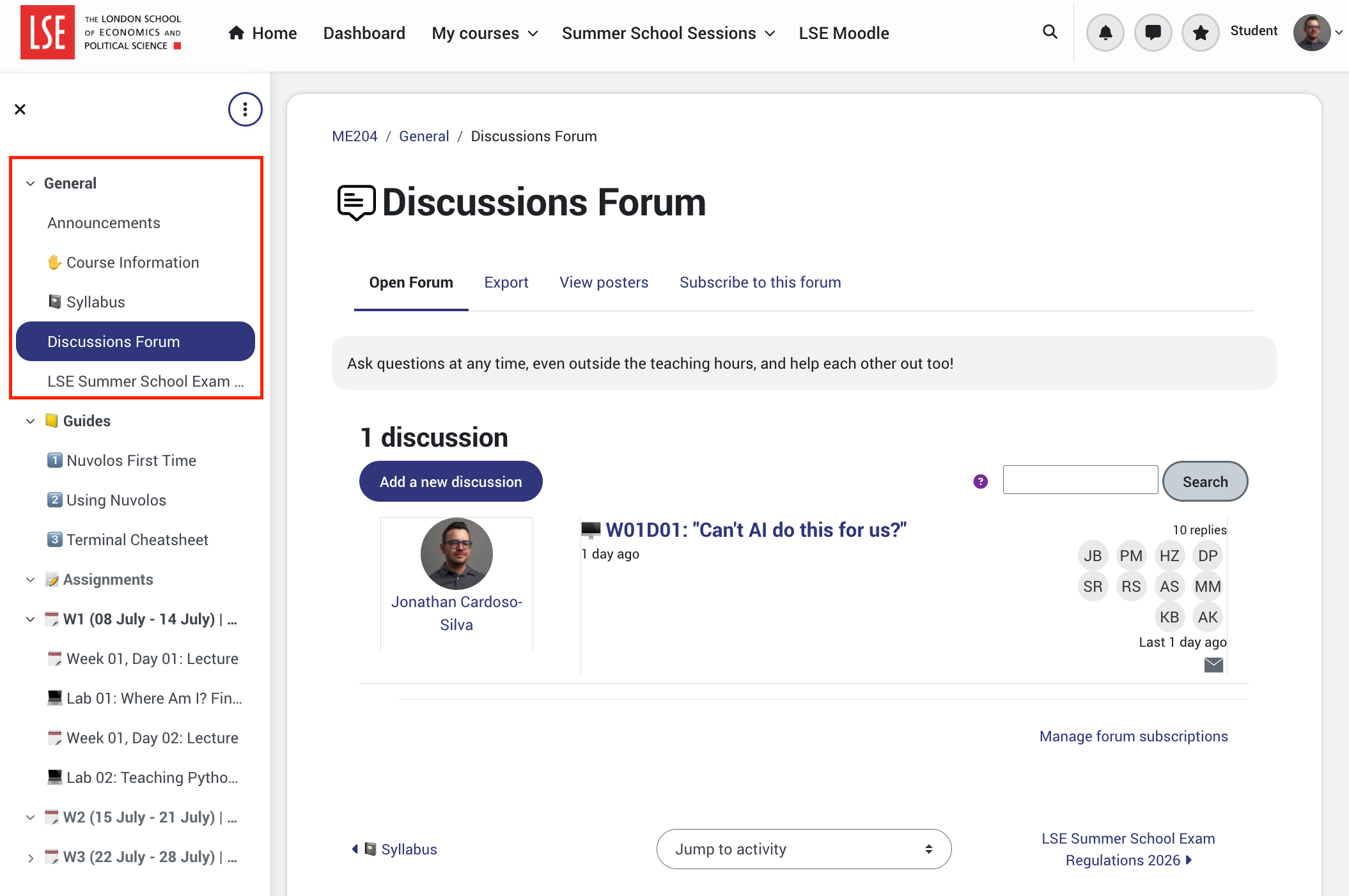
Post your group’s finding in one sentence to the Discussion Forum.
☕ Coffee Break
11:30 – 11:45

After the break:
- Fetch weather data with Python
requests - Turn JSON into a table (on paper, then with pandas)
- Save and reload JSON
- A preview of VS Code and Jupyter for the lab
4️⃣ Fetching Open-Meteo Data with requests
11:45 – 12:25
Build a Rainfall Request
The dictionary keeps the parameters readable. Requests adds them to the endpoint URL and sends an HTTP GET request.
requests.get() returns a single value called a response. Like a dictionary, it bundles several pieces of information under one name: .status_code, .text, .headers, and .json().
Run this in ME204_W01D03_Lecture.py or in ipython. No output appears unless you ask for one. The response object is now in memory.
Official documentation: Requests, Passing parameters in URLs and Open-Meteo Forecast API.
Check the Response
200
https://api.open-meteo.com/v1/forecast?latitude=51.5085&longitude=-0.1257&daily=rain_sum&timezone=Europe%2FLondon&forecast_days=3200means the request succeeded.response.urlshows the endpoint and encoded query parameters that Requests sent.
200
https://api.open-meteo.com/v1/forecast?latitude=51.5085&longitude=-0.1257
  &daily=rain_sum&timezone=Europe%2FLondon&forecast_days=3
Official documentation: Requests, Response status codes.
Turn the Response into Python Objects
dictThe HTTP response contains JSON text. response.json() decodes that text into Python objects.
| JSON | Python |
|---|---|
| object | dictionary |
| array | list |
| string | string |
| number | integer or float |
Official documentation: Requests, JSON response content.
Explore the JSON Structure
Output
<class 'dict'>dict_keys(['latitude', ..., 'daily_units', 'daily'])<class 'dict'>dict_keys(['time', 'rain_sum'])Use keys to move through nested dictionaries:
Lists Inside the daily Dictionary
Code
Output
<class 'list'><class 'list'>33The matching positions describe the same day:
The values can change when the forecast changes. The structure and units tell us how to read them.
🔍 From JSON to Rows and Columns
(Activity)
12:25 – 12:37
You have seen the parallel lists inside daily. Now draw the table they become.
Draw the table
This JSON has four lists under daily and three keys outside it.
{
  "latitude": 51.51, "longitude": -0.13, "elevation": 27.0,
  "daily_units": {"time": "iso8601", "temperature_2m_max": "°C",
                  "temperature_2m_min": "°C", "rain_sum": "mm"},
  "daily": {
    "time": ["2025-07-01","2025-07-02","2025-07-03","2025-07-04","2025-07-05","2025-07-06","2025-07-07"],
    "temperature_2m_max": [24.4, 19.8, 19.1, 22.0, 25.3, 27.1, 23.6],
    "temperature_2m_min": [13.7, 14.4, 12.6, 11.9, 14.1, 16.2, 15.0],
    "rain_sum":           [0.0,  2.1,  5.4,  0.0,  0.0,  0.0,  1.3]
  }
}
In your groups (5 min). On paper or a shared doc:
- Draw the table this data would become. How many rows? How many columns?
- What is the column header for each? What value goes in row 3, column 2?
- What would you do with
latitude,longitude, andelevation? Drop them or add them to the table?
Save and Reload the JSON
Save the Python objects as JSON:
Reload the file into a new variable:
Saved to ../data/weather/london_forecast_3_days.json
<class 'dict'>
dict_keys(['time', 'rain_sum'])
Official documentation: Python, json.dump() and json.load().
Read the Data Before You Analyse It
API access tells you how you received the data. It does not tell you how the values were produced.
Before analysis, check:
- Source: which organisation or model produced the values?
- Data type: observation, estimate, forecast, or model output?
- Spatial unit: point, grid cell, station, borough, or country?
- Temporal unit: hourly, daily, monthly, or annual?
- Variable definition: what does
rain_suminclude, and in which unit?
For example, Open-Meteo also distributes historical weather derived from ERA5-Land, a reanalysis model organised on a spatial grid. That description matters when deciding what a value can support.
The endpoint is the access route. The model or measurement system is the data source.
5️⃣ What you will use this afternoon
12:37 – 12:48
The afternoon lab runs in a Jupyter notebook inside VS Code on Nuvolos. Here is what you will see when you open it.
VS Code Is an Application
Visual Studio Code, usually called VS Code, is an application for working with code and files. It is an integrated development environment, or IDE, because several tools appear in one window.
Explorer
Browse folders and open files.
Editor
Read and change the selected file.
Terminal
Run the same Linux commands you used on Monday and Tuesday.
On Nuvolos, VS Code runs inside your ME204-2026 space and works with the files under /files/.
References: Visual Studio Code documentation and ME204, Using Nuvolos.
Open the Starter Notebook and Run a Cell
A Jupyter notebook is a document that keeps code, written explanation, and results together.
- In Nuvolos, open Applications and start VSCode.
- In the Explorer, open
/files/notebooks/. - Select
ME204_W01D03_Lab.ipynb. - Select a code cell and press the triangular Run Cell button.
- Read the output directly below the cell.
The notebook is running PythonRun cells from top to bottom. A later cell may depend on variables or imports created earlier.
Official documentation: VS Code, Jupyter notebooks.
Open the Integrated Terminal
Select Terminal > New Terminal from the VS Code menu. The terminal panel opens at the bottom of the window, running the same Linux shell you used on Monday.
This terminal starts inside VS Code, but it runs the same commands as the separate Terminal application.
Official documentation: VS Code, Getting started with the terminal.
6️⃣ Sneak peek: from JSON to a pandas table
12:48 – 12:55
You just drew the table a JSON response becomes. pandas builds it in one line. This is a preview of 🖥️ Week 01 Day 04 Lecture and Lab, where you will learn pandas properly.
JSON to DataFrame
pandas is a third-party Python library for working with tables. It is installed on Nuvolos.
Each dictionary key becomes a column. Values at the same list position become one row.
        time  rain_sum
  2026-07-15       0.0
  2026-07-16       1.4
  2026-07-17       0.2
Run ME204_W01D03_Lecture.py before class for today’s values.
Official documentation: pandas, DataFrame.
Preview to_csv
One method writes the table as a CSV file:
to_csv()writes the DataFrame to the named path.index=Falseprevents pandas from adding the row numbers as another column.
This is a preview. 🖥️ Week 01 Day 04 Lecture teaches how to inspect, select, and transform data with pandas.
Official documentation: pandas, DataFrame.to_csv.
Thanks!
12:55
This afternoon, open ME204_W01D03_Lab.ipynb and use the same request pattern to collect and inspect weather data.
💬 Post questions and observations to the Discussion Forum on Moodle. Your class teacher is also there to help during the afternoon lab.
References: Data and Download Tools
- ONS Census 2021 dataset TS001: the official page for the population dataset used in the download demonstration.
curlcommand-line manual: the official reference for everycurloption, including--locationand--output.- Chrome DevTools: Inspect network activity: instructions for opening the Network panel and examining requests made by a webpage.
- Everything curl: Redirects: an explanation of HTTP redirects and why
curlneeds--locationto follow them.
References: HTTP and Python
- MDN: HTTP messages: a guide to what HTTP requests and responses contain.
- MDN: HTTP response status codes: a reference for codes such as
200,301,302, and404. - Requests: Quickstart: the official beginner’s guide to
requests.get(), response content, status codes, and redirects in Python.
References: HTTP Response Status Codes
The first digit tells you the broad result: 1xx information, 2xx success, 3xx redirection, 4xx a problem with the request, and 5xx a problem on the server.
1xx: Information
| Code | Meaning |
|---|---|
100 Continue |
Keep sending the request |
101 Switching Protocols |
Change to another protocol |
2xx: Success
| Code | Meaning |
|---|---|
200 OK |
Request succeeded |
201 Created |
A new resource was created |
202 Accepted |
Request accepted for later processing |
204 No Content |
Request succeeded with no response body |
3xx: Redirection
| Code | Meaning |
|---|---|
301 Moved Permanently |
Use the new address permanently |
302 Found |
Use another address for now |
304 Not Modified |
Use the cached copy |
307 Temporary Redirect |
Repeat the same request temporarily elsewhere |
308 Permanent Redirect |
Repeat the same request permanently elsewhere |
4xx: Problem with the request
| Code | Meaning |
|---|---|
400 Bad Request |
Server could not understand the request |
401 Unauthorized |
Authentication is required |
403 Forbidden |
Server refuses access |
404 Not Found |
Requested address was not found |
405 Method Not Allowed |
HTTP method is not allowed here |
408 Request Timeout |
Request took too long |
409 Conflict |
Request conflicts with the current state |
429 Too Many Requests |
Client has sent requests too quickly |
5xx: Problem on the server
| Code | Meaning |
|---|---|
500 Internal Server Error |
Server encountered an unexpected problem |
501 Not Implemented |
Server does not support the requested action |
502 Bad Gateway |
Another server returned a bad response |
503 Service Unavailable |
Server is temporarily unavailable |
504 Gateway Timeout |
Another server took too long to respond |
Full reference: MDN, HTTP response status codes.
References: APIs and Open-Meteo
- MDN: Application Programming Interface: a concise definition of an API and how software uses one.
- MDN: Representational State Transfer: a short explanation of REST and web requests for resources.
- Open-Meteo Forecast API: the official endpoint builder and parameter reference for forecast requests.
- Open-Meteo Historical Weather API data sources: descriptions of the models and reanalysis datasets that Open-Meteo distributes.
References: VS Code and Jupyter
- Visual Studio Code documentation: the official guide to the editor, Explorer, extensions, and other parts of VS Code.
- VS Code: Jupyter notebooks: instructions for opening, running, and editing notebook cells in VS Code.
- VS Code: Integrated terminal: instructions for opening and using a terminal inside VS Code.
- Jupyter Notebook documentation: an explanation of notebook documents, cells, kernels, and outputs.
- ME204: Using Nuvolos: the course guide for opening the ME204-2026 space and its applications.
References: Python and pandas
- Python:
json: the standard-library reference for saving JSON withjson.dump()and loading it withjson.load(). - pandas:
DataFrame: the official reference for constructing a table from a dictionary. - pandas:
to_datetime: the official reference for converting strings into date and time values. - pandas:
DataFrame.to_csv: the official reference for writing a DataFrame to CSV.
These slides were built with Quarto.

LSE Summer School 2026 | ME204 Week 01 Day 03
LSE ME204 (2026)