Week 09
Methodology Design and Exploratory Data Analysis
DS105A – Data for Data Science
🗓️ 27 Nov 2025
Today’s Goals
- Learn SMART-C from scratch and document how it guides your Mini-Project 2 methodology
- Practise giving and receiving methodology feedback using the Impact/Feasibility cards
- Build a checklist for exploratory data analysis so you avoid common mistakes before lab discussions
These activities prepare you for your ✍️ Mini-Project 2 exploration week.
Before we start…
What kind of study are we doing?
Your ✍️ Mini-Project 2 is an exploratory study.
In our context, Exploratory Data Analysis (EDA) means:
- we are not trying to prove a scientific hypothesis, you’d need knowledge of statistics for that (e.g. “people who live in areas with poor transport connectivity are more likely to have health problems”)
- we are not trying to find a causal relationship either (e.g. “if we give people in areas with poor transport connectivity a free bus pass, will they use it more?”)
- we ARE trying to find interesting patterns and relationships in the data (think of it more like “hey, look what I found in the data! what do you think this could mean?”)
📋 Key point: You do not need to prove anything in your Mini-Project 2. You are just trying to find interesting patterns and relationships in the data.
How much of London do you need?
Therefore…
- You do not need to cover ALL of London to successfully complete the assignment.
- You do need to justify why you chose those specific 5+ postcodes.
- You can (maybe you should) refine the question of “Where are the areas in London with poor transport connectivity?” to a more narrow one.
Examples of what you could do…
If you don’t even know where to start, pick one of these strategies:
| Strategy | Description | Examples of narrower questions |
|---|---|---|
| Localised comparisons | Compare journeys for postcodes within a single area (same borough/LSOA/MSOA/OA) | > “Does everyone who live in Newham have the same level of transport connectivity?” > “Does it matter if you live north of Victoria Park or south of it?” |
| Cross-borough comparisons | Compare journeys for postcodes across neighbouring (or completely geographically opposite) boroughs | > “How are people in Tower Hamlets better connected to the rest of London than people in Barking and Dagenham?” |
| Socio-economic comparisons | Pick postcodes on different ends of the deprivation spectrum on the Index of Multiple Deprivation (IMD) | > “Are people in the most deprived areas of London more likely to have poor transport connectivity than people in the least deprived areas?” |
| Time-based comparisons | Compare journeys for postcodes at different times of the day/week/month/year | > “How does transport connectivity change throughout the day?” > “How does transport connectivity change throughout the week?” > “How does transport connectivity vary between the peak and off-peak hours?” |
1️⃣ Methodology Clinic

Activity: Round 1 Pitch
This is what we will do in the first part of the lecture.
Structure:
- Methodology Pitches: Present your ✍️ Mini-Project 2 approach to others in the room in groups of 3-4 (a ‘pitch’)
- Complete feedback cards for each pitch as you listen to your colleagues
- Mentimeter Positioning: Submit average scores from your cards
Impact/Feasibility Framework
You will now listen to your colleagues explain about the methodology they are using (or will use) for their ✍️ Mini-Project 2.
I want you to help them by evaluating their methodology using two dimensions:
- Impact: Does the methodology guarantee that the research question will be answered to some degree? Is it likely to produce useful insights?
- Feasibility: Does it look like the person has the time, data, and skills to implement this?
You will then use the Impact/Feasibility Framework (next slide) to help them refine their methodology. You will use a physical card to do so.
Peer Evaluation Form
A speech script for your pitch to your colleagues:
- I have defined ‘poor transport connectivity’ as
___________________________________ (or say “I don’t know yet 🥲”) - I selected/will select postcodes based on
___________________________________ (or say “I have not decided yet 🤔”) - I think I will be able to show that
___________________________________ (or say “I don’t know yet 🥲”) - And this is what I have already done:
___________________________________ (or say “I have not started properly! 😭”)
FEEDBACK CARD
Impact Score (1-5): _______
Feasibility Score (1-5): ______
A physical card for the peer evaluation will be provided during the lecture.
Mentimeter: Initial Positioning
Poll 1: Where is your methodology now?
Your colleagues gave you feedback on your methodology, now let’s document this using Mentimeter.
Submit the average Impact and Feasibility scores you got the feedback you received.
Mentimeter access code will be provided during the lecture.
The Four Zones
LOW FEASIBILITY
HIGH FEASIBILITY
HIGH IMPACT
REFINE ZONE
(High Impact + Low Feasibility)
Valuable direction but you’re being a bit too ambitious.
PURSUE ZONE
(High Impact + High Feasibility)
Strong approach that’s achievable.
LOW IMPACT
AVOID ZONE
(Low Impact + Low Feasibility)
Weak approach with high difficulty.
SAFE ZONE
(Low Impact + High Feasibility)
Easy to execute, just not super original.
This is perfectly fine!
Individual SMART-C Reflection
Now, take some time alone to reflect on your methodology and the feedback you received. You will use the SMART-C Criteria Checklist to help you do this (next slide).
🕰️ 15 minutes (Jon will walk around helping you reflect on your methodology)
SMART-C Criteria Checklist
| ✓ Criterion | Check |
|---|---|
| ✓ SPECIFIC | - How are you defining ‘poor transport connectivity’? - What comparison strategy are you going for? |
| ✓ MEASURABLE | - How are you quantifying ‘poor transport connectivity’? - Does the TfL API (and/or the ONS dataset) allow you to do this? |
| ✓ ACHIEVABLE | - How much free time do you have to complete this? - Can you implement this easily in NB03? Or would you need to re-do NB01 or NB02 to do this? |
| ✓ RELEVANT | - Does it answer the research question? (you don’t need to cover ALL of London, you can focus on a specific area) |
| ✓ TESTABLE | - How will you play “devil’s advocate” and test your methodology? (how would you prove without shadow of a doubt that your insights are valid?) |
| ✓ CLEAR | - Would a “no-coder” (someone who did not take DS105) understand what you did if they read the REPORT.md? (how clear is your methodology and your writing about the insights?) |
Peer Evaluation Form - ROUND 2
A speech script for your pitch to your colleagues:
- I have defined ‘poor transport connectivity’ as
___________________________________ (or say “I don’t know yet 🥲”) - I selected/will select postcodes based on
___________________________________ (or say “I have not decided yet 🤔”) - I think I will be able to show that
___________________________________ (or say “I don’t know yet 🥲”) - And this is what I have already done:
___________________________________ (or say “I have not started properly! 😭”)
FEEDBACK CARD
Impact Score (1-5): _______
Feasibility Score (1-5): ______
A physical card for the peer evaluation will be provided during the lecture.
Mentimeter: Post-Refinement
Poll 2: Where is your methodology after refinement?
Submit your refined methodology position after applying SMART-C criteria.
Compare to Round 1 distribution.
Discussion: What patterns do we see? How did methodologies evolve?
2️⃣ Exploratory Data Analysis
Important considerations in Exploratory Data Analysis (EDA).
1. Always check if your data is complete
Result:
tconst             100.000000
title_type         100.000000
primary_title       99.999809
original_title      99.999809
is_adult           100.000000
start_year          88.028503
end_year             1.238095
runtime_minutes     35.460020
genres              95.623222
dtype: float64
That is
- 100% of the lines have a
tconst,title_type, andis_adult - But only 1.24% has an
end_year - Weirdly, only 88% has a
start_year?!
1.1 Investigate which rows are missing data
This should prompt you to do further checks, say:
That is, to investigate further: which ones are empty? Why does it seem like they are empty?
Is this a data collection failure? → try to fix it → document if unable to
Is it just how the data is structured? → acknowledge how it might impact your analysis
Don’t try to ‘impute’ missing data. It’s too advanced for this course.
1.2 Check if missingness is systematic
You never know, sometimes the existence of missing data IS the insight. To check, see if the missingness is systematic (it appears more often for certain categories):
| start_year | end_year | runtime | genres | total | |
|---|---|---|---|---|---|
| title_type | |||||
| tvPilot | 100.00 % | 0.00 % | 0.00 % | 0.00 % | 1 |
| tvShort | 99.07 % | 0.00 % | 87.65 % | 100.00 % | 10,810 |
| videoGame | 97.43 % | 0.00 % | 1.06 % | 85.28 % | 45,838 |
| tvSpecial | 99.26 % | 0.00 % | 48.10 % | 87.25 % | 55,604 |
| tvMiniSeries | 93.26 % | 57.00 % | 35.06 % | 95.24 % | 66,293 |
| tvMovie | 97.20 % | 0.00 % | 68.70 % | 91.24 % | 152,979 |
| tvSeries | 91.65 % | 38.40 % | 37.36 % | 92.06 % | 290,570 |
| video | 99.42 % | 0.00 % | 68.01 % | 97.35 % | 318,364 |
| movie | 85.22 % | 0.00 % | 63.15 % | 89.41 % | 731,704 |
| short | 96.10 % | 0.00 % | 64.11 % | 100.00 % | 1,094,537 |
| tvEpisode | 86.48 % | 0.00 % | 28.22 % | 95.82 % | 9,296,511 |
Code recipe: pandas groupby + apply
The following slides contain the code to reproduce the table above.
Step 1: Define a helper function that computes completeness percentages per group:
def count_completeness(group):
    total = len(group)
    return pd.Series({
        'total': total,
        'start_year': group['start_year'].notna().sum() / total * 100,
        'end_year': group['end_year'].notna().sum() / total * 100,
        'runtime': group['runtime_minutes'].notna().sum() / total * 100,
        'genres': group['genres'].notna().sum() / total * 100
    })
Step 2: Apply it to each title_type group:
Code recipe: pandas groupby + apply (cont.)
Step 3: Style it with bars and format percentages:
(
    plot_df.sort_values('total')
    .style
    .bar(vmin=0, vmax=100, height=100, width=100,
         props="border: 1px solid #212121;",
         subset=['start_year', 'end_year', 'runtime', 'genres'])
    .format('{:,.2f} %', subset=['start_year', 'end_year', 'runtime', 'genres'])
    .format('{:,.0f}', subset=['total'])
    .set_caption('Table 1. How complete is table title_basics?<br>(breakdown per field and title_type)')
)
Hybrid SQL + pandas approach
SQL counts non-NULL values per column automatically:
Then compute percentages and style in pandas:
raw_df = pd.read_sql(query, conn)

plot_df = raw_df.assign(
    start_year=lambda df: df['has_start_year'] / df['total'] * 100,
    end_year=lambda df: df['has_end_year'] / df['total'] * 100,
    runtime=lambda df: df['has_runtime'] / df['total'] * 100,
    genres=lambda df: df['has_genres'] / df['total'] * 100
)[['title_type', 'start_year', 'end_year', 'runtime', 'genres', 'total']]
(Then the styler is the same as in the previous slide.)
2. Check the distribution
I have this table of all directors listed on IMDb:
- In total I have n = 266 466 directors
- Two numeric columns per director:
total_movies: how many movies they directed overall in their entire careertop1000_movies: how many of those fall in the top 1000 most popular and highly-rated movies
How could I make sense of the distribution of these two columns?
plot_df.head(10)
| primary_name | total_movies | top1000_movies |
|---|---|---|
| Akira Kurosawa | 31 | 13 |
| Ingmar Bergman | 41 | 10 |
| Alfred Hitchcock | 57 | 9 |
| Martin Scorsese | 53 | 9 |
| Quentin Tarantino | 15 | 9 |
| Christopher Nolan | 14 | 9 |
| Stanley Kubrick | 13 | 9 |
| Ertem Egilmez | 44 | 8 |
| Steven Spielberg | 37 | 8 |
| Billy Wilder | 26 | 8 |
2.1 How to get a sense of the distribution
You can use describe():
Which produces:
count    266466.000000
mean          2.662099
std           5.968662
min           1.000000
25%           1.000000
50%           1.000000
75%           2.000000
max         438.000000
Name: total_movies, dtype: float64
How to read this output?
countis the total number of directorsmeanis the statistical mean number of movies directedstdis the standard deviation of the number of movies directedminis the minimum number of movies directed25%is the 25th percentile of the number of movies directed50%is the median number of movies directed75%is the 75th percentile of the number of movies directedmaxis the maximum number of movies directed
2.2 How to get a visual sense of the distribution
Histogram approach:
A histogram allows you to see the full distribution of the data.
In this case, look at how crazy skewed the distribution is!
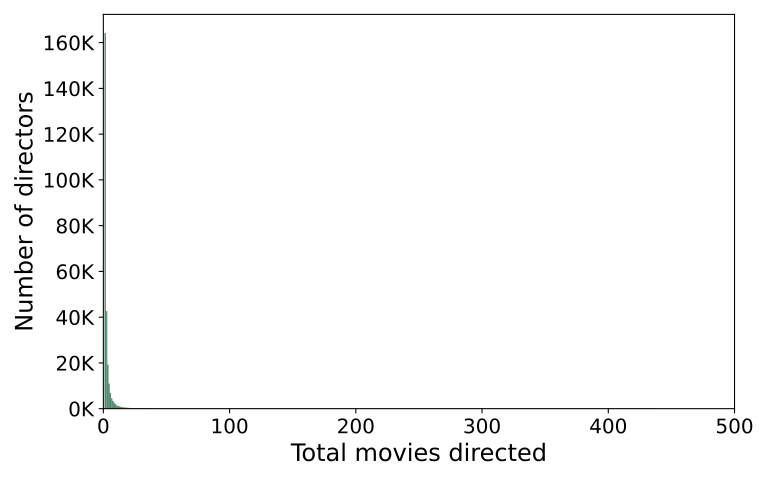
By the way, you don’t need a title here…
- When you are just exploring your data in your
NB03, you don’t need to have a polished title yet. - If you think this is worth adding to your
REPORT.md, then add a narrative title to your plot.
2.3 Second attempt at visualising the distribution
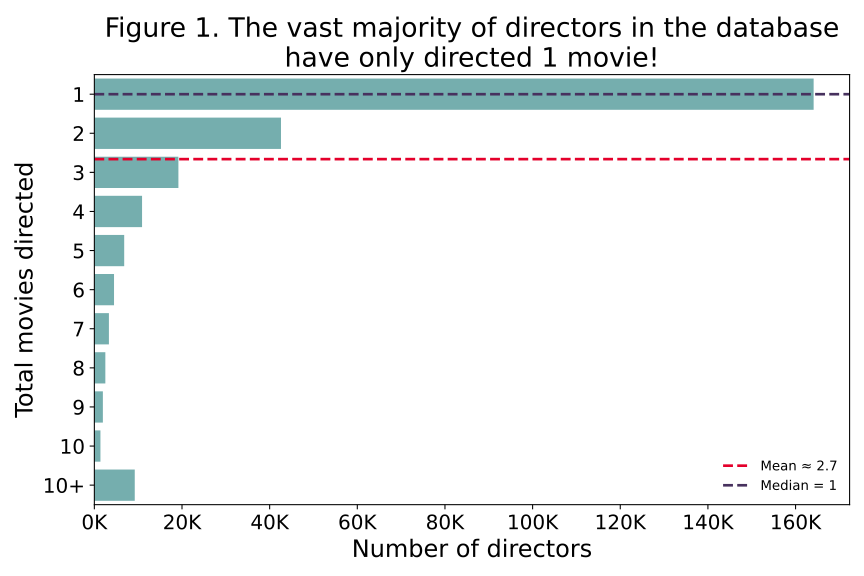
If you further process the data carefully, you can get a more informative histogram 👉
- The mean number of movies (2.66) isn’t a good measure of average when have skewed distributions like this.
- The median number of movies (1) is a better measure of average in this case
Code recipe: replicating the histogram plots (slide 1/7)
Assuming you have loaded each of the IMDB tables into pandas DataFrames, this is how you would create the df_top_directors DataFrame.
Step 1: Identify the top-rated popular movies:
We need to do several merges because the information we need is spread across multiple tables.
Step 2: Count total movies and top movies per director:
director_movies = (
    df_title_principals[df_title_principals['category'] == 'director']
    .merge(df_title_basics[df_title_basics['title_type'] == 'movie'], on='tconst')
    .merge(df_name_basics[['nconst', 'primary_name']], on='nconst')
)

director_movies['is_top'] = director_movies['tconst'].isin(top_movies['tconst'])

df_top_directors = (
    director_movies
    .groupby(['nconst', 'primary_name'])
    # .agg() is like .apply() but for common aggregation functions
    # the column 'total_movies' is the count of tconst values
    # the column 'top1000_movies' is the sum of is_top values (True/False)
    .agg(
        total_movies=('tconst', 'count'),
        top1000_movies=('is_top', 'sum')
    )
    .reset_index()
    .sort_values(['top1000_movies', 'total_movies'], ascending=False)
)
Code recipe: replicating the histogram plots (slide 2/7)
Here is the big SQL query to achieve the same result as the previous slide.
SELECT
    nb.nconst,
    nb.primary_name,
    COUNT(*) AS total_movies,
    COUNT(CASE WHEN top.tconst IS NOT NULL THEN 1 END) AS top1000_movies
FROM title_principals AS tp
JOIN name_basics AS nb
    ON tp.nconst = nb.nconst
JOIN title_basics AS tb
    ON tp.tconst = tb.tconst
LEFT JOIN (
    SELECT tb2.tconst
    FROM title_basics AS tb2
    JOIN title_ratings AS tr2
        ON tb2.tconst = tr2.tconst
    WHERE tb2.title_type = 'movie'
      AND tr2.num_votes > 10000
    ORDER BY tr2.average_rating DESC, tr2.num_votes DESC
    LIMIT 1000
) AS top
    ON tb.tconst = top.tconst
WHERE tp.category = 'director'
  AND tb.title_type = 'movie'
GROUP BY nb.nconst, nb.primary_name
ORDER BY top1000_movies DESC, total_movies DESC;
which I then load into pandas like this:
Code recipe: replicating the histogram plots (slide 3/7)
The following slides contain the code to replicate the histogram plots.
First, a word about formatting the y-axis labels: In these examples, I used a feature from matplotlib called FuncFormatter to format the y-axis labels with the K suffix for thousands (e.g. 1000 -> 1K). Read the documentation for more details.
Then later in the code, you can use it like this:
Go to the next slide to see the code for the first plot.
Code recipe: replicating the histogram plots (slide 4/7)
Here is the code to replicate the first histogram plot.
We use the sns.histplot() function to create the histogram.
fig, ax = plt.subplots(figsize=(7, 4)) # Fix figure size here
sns.histplot(
    data=df_top_directors,
    x='total_movies',
    binwidth=1, # How to group the data into bins
    color='#2d8659',
    ax=ax
)

# I manually set the limits to 0-500,
# but a robust approach would be to use `ax.set_xlim(0, df['total_movies'].max())`
ax.set_xlim(0, 500)
# Format the y-axis labels with the `K` suffix for thousands (e.g. 1000 -> 1K)
ax.yaxis.set_major_formatter(mtick.FuncFormatter(lambda x, _: f"{x/1000:.0f}K"))
ax.set_xlabel('Total movies directed', fontsize=18)
ax.set_ylabel('Number of directors', fontsize=18)
ax.tick_params(axis='both', labelsize=15)
# Wrap up and save
fig.tight_layout()
fig.savefig('./figures/directors-total-movies-hist.svg', format='svg')Code recipe: replicating the binned bar chart (slide 5/7)
For the second plot, I did the aggregation “manually” by creating two DataFrames: one for the first 10 bins and one for the “10+” bin.
count_df = (
    df_top_directors
    .groupby('total_movies')
    .size()
    .reset_index(name='director_count')
    .sort_values('total_movies')
)

head_df = (
    count_df[count_df['total_movies'] <= 10]
    .assign(total_movies=lambda x: x['total_movies'].astype(int).astype(str))
)
tail_df = (
    count_df[count_df['total_movies'] > 10]
    .assign(total_movies=lambda x: '10+')
    .assign(director_count=lambda x: x['director_count'].sum())
)
Then we can concatenate the two DataFrames and plot the result:
Code recipe: replicating the binned bar chart (slide 6/7)
Then, it’s a matter of calling sns.barplot() to create the bar chart. I like them horizontal because it’s easier to read the labels.
Code recipe: replicating the binned bar chart (slide 7/7)
But I also add a horizontal line at the mean and median values to help guide the eye.
mean_val = plot_df['director_count'].mean()
median_val = plot_df['director_count'].median()


ax.axhline(mean_val - 1, # I subtract 1 to align with the bars
           color='#e4002b',
           linestyle='--',
           linewidth=2,
           label=f"Mean ≈ {mean_val:.1f}")
ax.axhline(median_val - 1, # I subtract 1 to align with the bars
           color='#47315E',
           linestyle='--',
           linewidth=2,
           label=f"Median = {median_val:.0f}")
ax.legend(frameon=False, loc='lower right')
3. Check your distributions (another example)
Now, let’s look at a distribution that is not skewed.
I selected only movies (title_type = ‘movie’) that have more than 10,000 votes.
Here are the top 10 highest-rated popular movies of all time:
| primary_title | year | average_rating | num_votes |
|---|---|---|---|
| The Shawshank Redemption | 1994 | 9.30 | 3120155 |
| The Godfather | 1972 | 9.20 | 2175958 |
| The Chaos Class | 1975 | 9.20 | 45308 |
| Attack on Titan the Movie: The Last Attack | 2024 | 9.20 | 21568 |
| Ramayana: The Legend of Prince Rama | 1993 | 9.10 | 17401 |
| The Dark Knight | 2008 | 9.10 | 3095865 |
| The Lord of the Rings: The Return of the King | 2003 | 9.00 | 2119280 |
| Schindler’s List | 1993 | 9.00 | 1555434 |
| 12 Angry Men | 1957 | 9.00 | 956229 |
| The Godfather Part II | 1974 | 9.00 | 1462039 |
Code recipe: replicating the movie rating plots (slide 1/4)
Assuming you have loaded the IMDB tables into pandas DataFrames, here’s how to build the df_top_movies dataset.
Filter for popular movies (more than 10,000 votes):
Code recipe: replicating the movie rating plots (slide 2/4)
Here is the SQL query to achieve the same result as the previous slide.
which I then load into pandas like this:
Code recipe: replicating the movie rating plots (slide 3/4)
Here’s how to create the box plot with quartile annotations.
We use sns.boxplot() and then add vertical lines for Q1, median, and Q3:
fig, ax = plt.subplots(figsize=(9, 2.6))
sns.boxplot(
    data=df_top_movies,
    x='average_rating',
    color='#6BB8B7',
    ax=ax
)

ax.set_xlabel('Average rating (popular films)', fontsize=18)
ax.set_ylabel('')
ax.tick_params(axis='both', labelsize=16)

fig.tight_layout()
fig.savefig('./figures/top-movies-rating-boxplot.svg', format='svg')
Code recipe: replicating the movie rating plots (slide 4/4)
For the histogram, we use sns.histplot() and add mean and ±1 standard deviation markers.
fig, ax = plt.subplots(figsize=(9, 4))
sns.histplot(
    data=df_top_movies,
    x='average_rating',
    binwidth=0.2,
    color='#2d8659',
    ax=ax
)

ax.set_xlabel('Average rating (popular films)', fontsize=18)
ax.set_ylabel('Number of movies', fontsize=18)
ax.tick_params(axis='both', labelsize=15)
ax.set_xlim(0, 10)
ax.xaxis.set_major_locator(mtick.MultipleLocator(1))

# Clear up the plot and save
ax.spines['top'].set_visible(False)
ax.spines['right'].set_visible(False)
fig.tight_layout()
fig.savefig('./figures/top-movies-rating-hist.svg', format='svg')
3.1 Boxplot as a visual summary of the distribution
Once again, you can use describe():
Which produces:
count    12118.000000
mean         6.584832
std          1.016968
min          1.000000
25%          6.000000
50%          6.700000
75%          7.300000
max          9.300000
Name: average_rating, dtype: float64
Alternatively, you can view this as a boxplot:
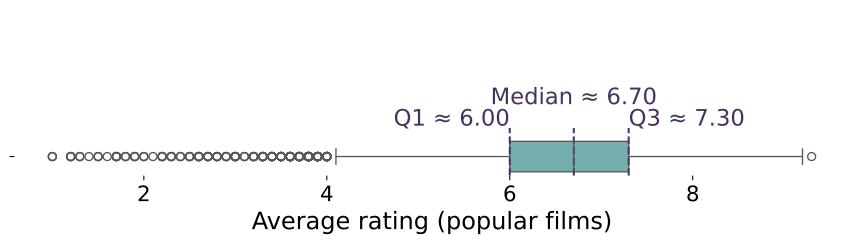
The way I like to describe this is:
- Typically, popular movies have an average rating between 6.0 and 7.3.
- There are only a few movies with an exceptionally high rating (9.3)
- There is a small group (albeit a sizeable group) of movies with an average rating below 4.0
3.2 This time the histogram works
Because the distribution is not skewed, the distribution of the data is symmetric similar to a normal distribution.
When the data looks like a bell curve, the mean and the median are very similar and it makes sense to use mean and standard deviation to describe the distribution.
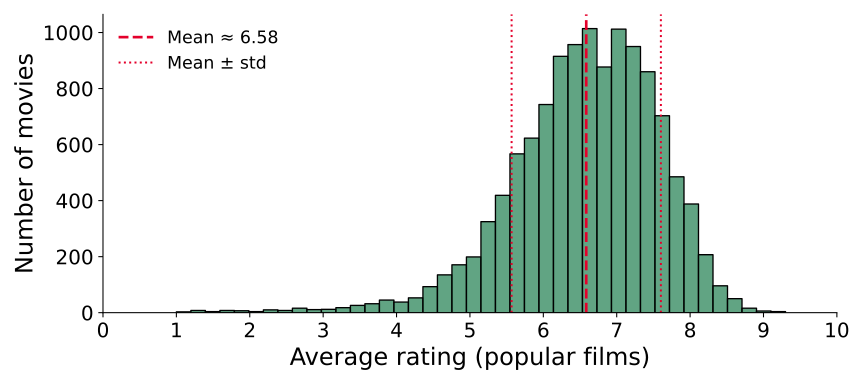
The way I like to describe this using the mean and standard deviation as estimators:
- Most popular movies have an average rating between 5.6 and 7.6, with an average rating of about 6.6.
4. Outliers are always worth investigating
Just who are these highly prolific directors?
| nconst | primary_name | total_movies | top1000_movies | |
|---|---|---|---|---|
| 710 | nm0644554 | Kinya Ogawa | 438 | 0 |
| 711 | nm0183659 | Gérard Courant | 402 | 0 |
Do a bit of research to find out who these directors are and to confirm that this is not an error in your data collection process but rather a reflection of very unique individual careers.
What are these exceptionally highly rated movies?
| primary_title | year | avg_rating | num_votes |
|---|---|---|---|
| The Shawshank Redemption | 1994 | 9.30 | 3120155 |
| The Godfather | 1972 | 9.20 | 2175958 |
| The Chaos Class | 1975 | 9.20 | 45308 |
| Attack on Titan the Movie: The Last Attack | 2024 | 9.20 | 21568 |
| Ramayana: The Legend of Prince Rama | 1993 | 9.10 | 17401 |
| The Dark Knight | 2008 | 9.10 | 3095865 |
Is this an insight? Well, it depends on what story you are trying to tell.
5. Correlation is not causation
Repeat after me: “correlation does not imply causation” (see fun examples here)
Conclusion
In this lecture, we have covered:
- How to think about your methodology for data science projects
- How to check the distribution of your data
- How to identify outliers
- How to interpret the mean and the median
⌛ Deadline: Week 10, Wednesday 3 December 2025, 8pm UK time
🆘 Support Sessions: Drop-in sessions next week
- (Pedro) In-person at the DSI visualisation studio (COL.1.06), Wednesday 1-5pm
- (Jon) Online but to be confirmed when (Monday or Tuesday)

LSE DS105A (2025/26)