Week 11
Software Engineering, AI Tools, and Final Projects

DS205 – Advanced Data Manipulation

30 Mar 2026

General Best Practices in Software Engineering

Over the past ten weeks you have been following several software engineering best practices without necessarily knowing their names. You declared dependencies, stored config in .env files, kept pipelines stateless, and used version control for everything. Today we give those practices their formal vocabulary, using a manifesto called the 12-Factor App as our guide.

What is 12-Factor?

The 12-Factor App is a set of best practices originally written by developers at Heroku, a cloud platform, with best practices for building web applications that are easy to deploy and maintain. It has since become a general reference for production software of all kinds.

# Factor
I Codebase
II Dependencies
III Config
IV Backing Services
V Build, Release, Run
VI Processes
# Factor
VII Port Binding
VIII Concurrency
IX Disposability
X Dev/Prod Parity
XI Logs
XII Admin Processes

Not all of these principles apply to what we are building, though. Our projects are more like proof-of-concept research pipelines than production services running at scale (what Heroku is for). But several of these principles are good general software engineering practices that are worth learning and applying to your projects 👉

Factors we skip

Some of these factors are important for production deployment but not for our projects. We will not cover them today.

Not for us

Factor Why we skip it
V. Build, Release, Run Separating build and deploy stages matters when you ship to servers so others can use your application. You are testing it all locally or at best via GitHub Actions.
VIII. Concurrency Scaling across processes matters at production load. You won’t have time to scale your pipeline across multiple machines reliably.
X. Dev/Prod Parity Keeping dev and production identical matters when you have a production environment. We won’t have a production environment.

Quick mentions:

IX. Disposability: good to know (fast startup, graceful shutdown), but not something you need to engineer for these projects.

VII. Port Binding: if you use Streamlit or uvicorn as we showed in this course, you are already following this factor. Nothing extra to do.

Factor I: Codebase

One codebase, tracked in version control, all deployments from that codebase.

This one is kind of straigthforward. We always worked liked this in DS205. There is no separate repo for “the working version” and another for “the experimental version.”

If you want to try something that might not work, create a branch. If it works, merge it. If it does not, delete the branch.

<your-group-repo>/
├── .env.example
├── .github/
│   └── copilot-instructions.md
├── CONTRIBUTING.md
├── DECISIONS.md
├── data/
│   ├── processed/
│   └── raw/
├── notebooks/
│   └── *.ipynb
├── README.md
├── requirements.txt
├── src/
│   ├── chunk.py
│   ├── embed.py
│   └── extract.py
└── tests/
    ├── test_chunk.py
    └── test_embed.py

From Codebase to GitFlow

Factor I leads directly to the question: how does a team of 3-4 people work on the same codebase without stepping on each other?

You did something like this in PS1, where you created a feature branch on a partner’s repo and submitted a pull request. Now you apply the same idea to your own group’s repository.

My advice:

  • If team members will usually work sequentially (one person finishes, then the next person starts), it’s alright to push directly to main.

    ⚠️ BUT: always run git pull before touching any code.

  • If someone wants to explore an idea that might not go anywhere, or if multiple people will be working in parallel, create a branch.

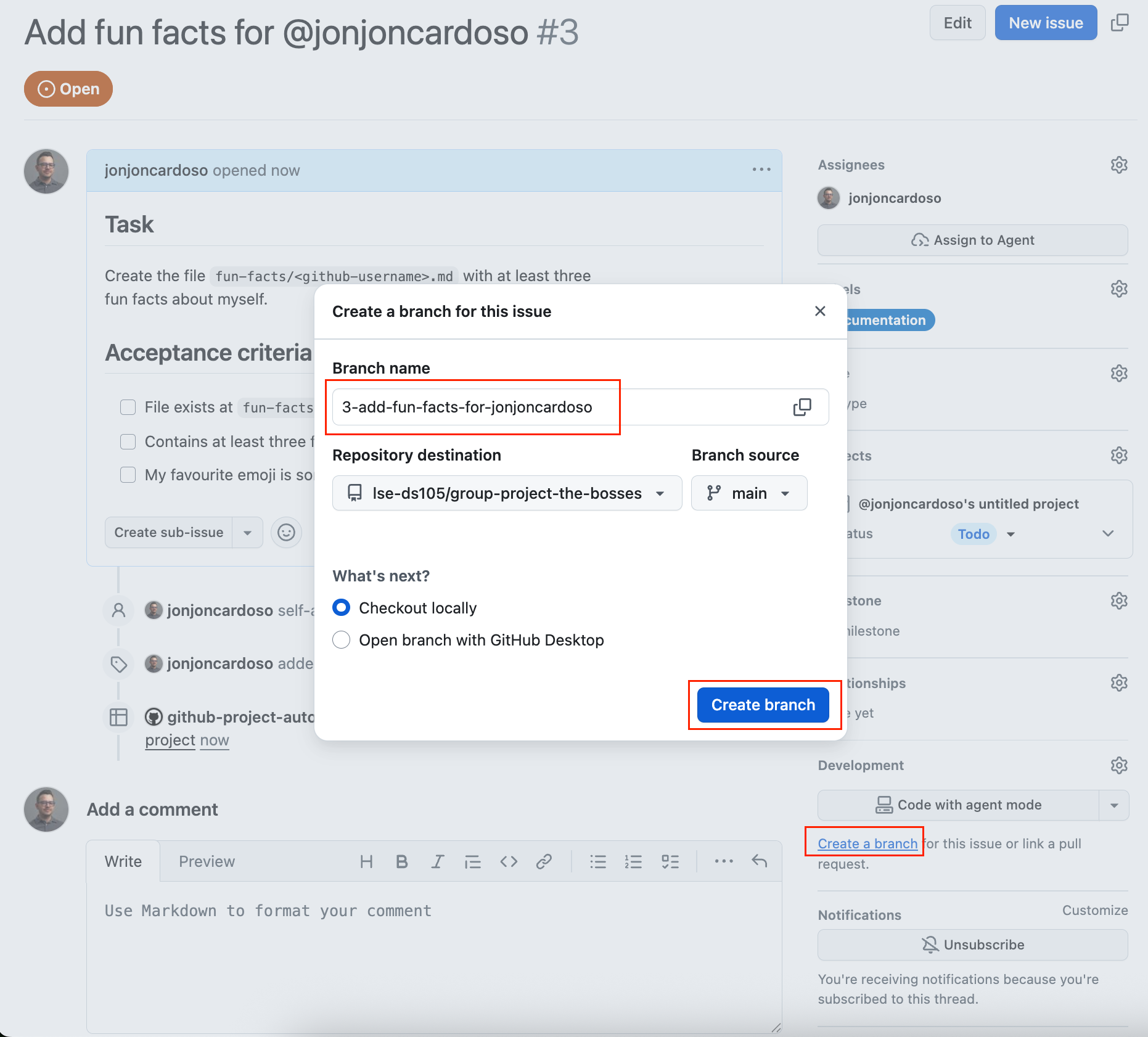
  • GitHub Issues are the unit of work. Create an Issue for each task. GitHub offers to create a branch from it. Work on the branch, open a PR when you want someone to validate the work before merging.

The Pull Request cycle (Part 1)

1 Create an Issue
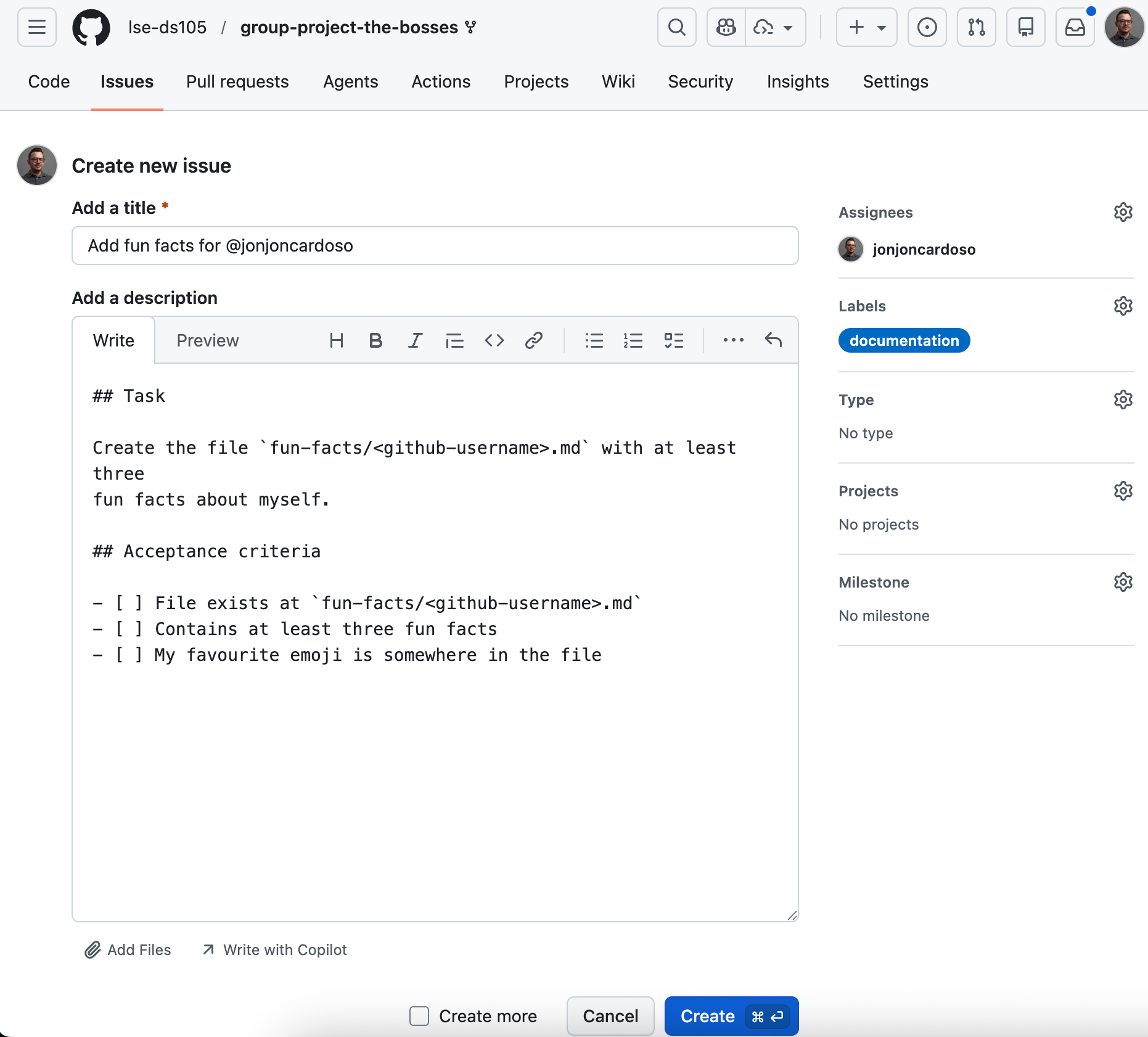
GitHub form for creating a new issue with title and description

2 Branch from the Issue

GitHub sidebar showing Create branch from issue

3 Work on the branch. Commit as you go and push so teammates can see progress. (No screenshot: this is your editor and terminal.)

The Pull Request cycle (Part 2)

4 Open a Pull Request
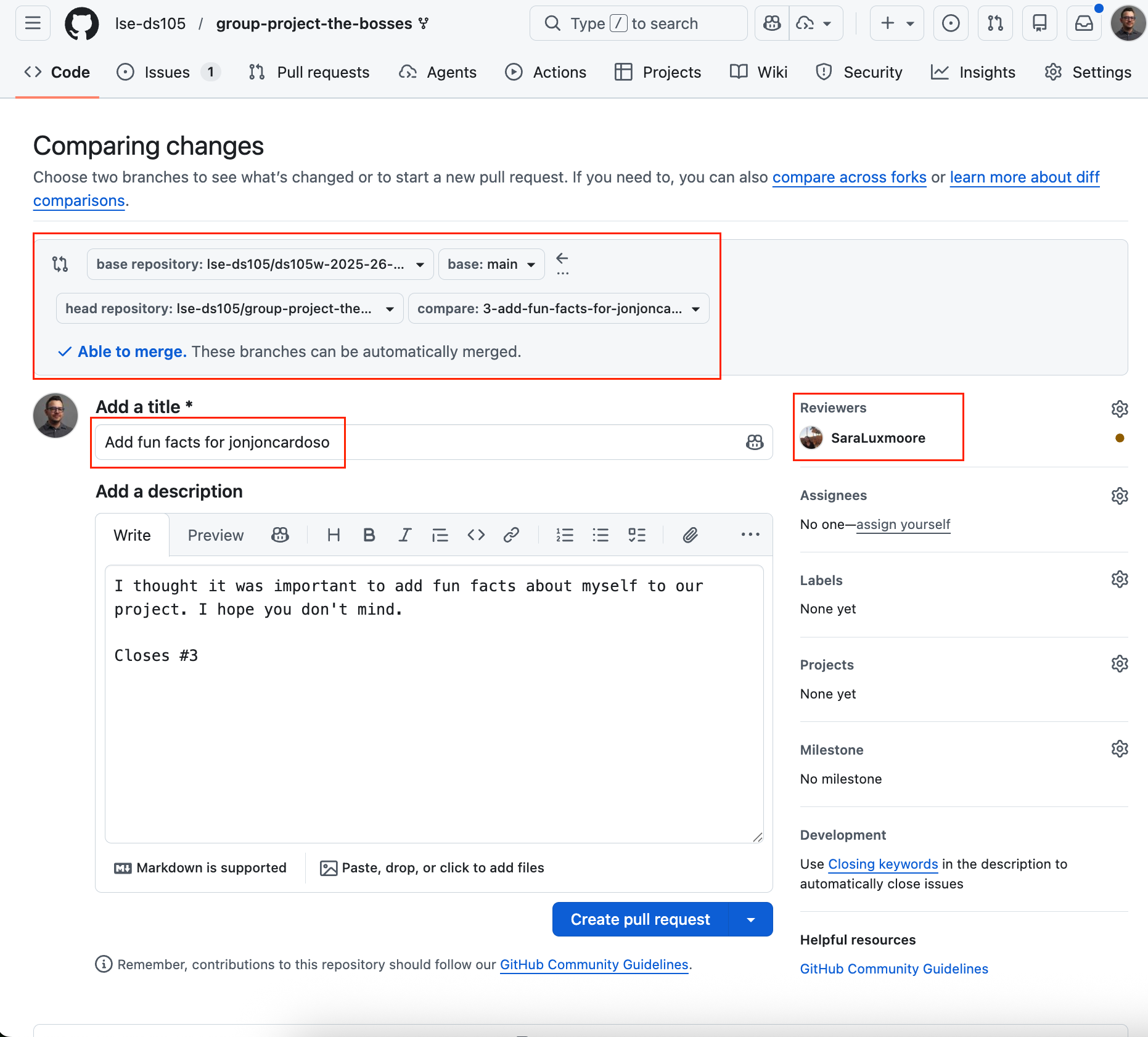
GitHub pull request with title, description, and Closes issue link

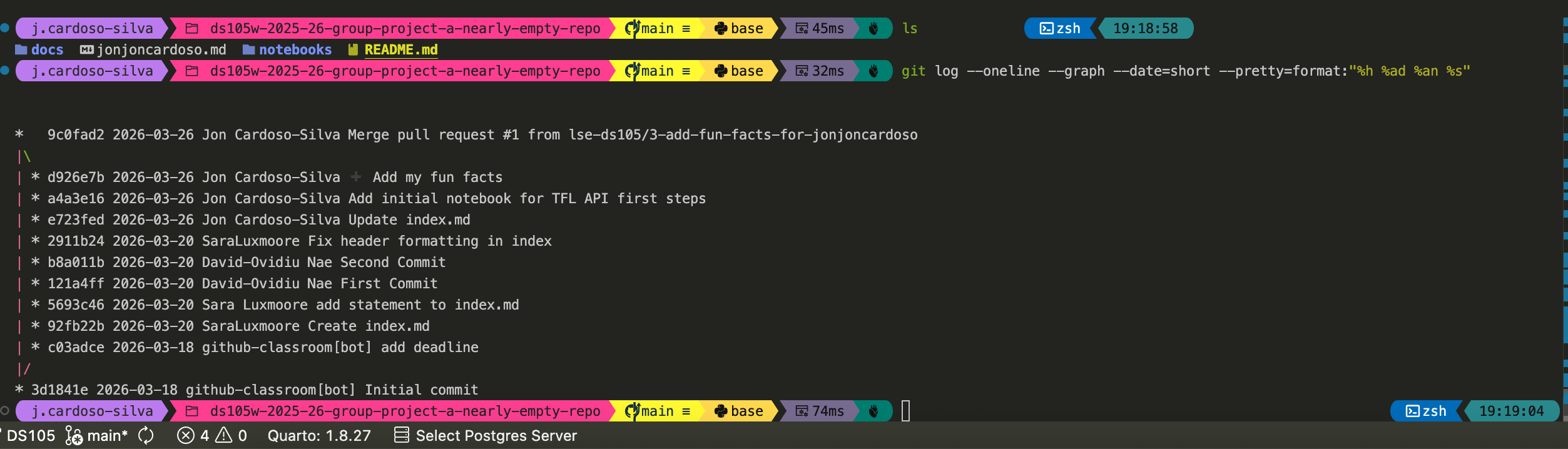
5 Review, merge, history

Git log graph showing branches and merge commits

Factor II: Dependencies

Explicitly declare and isolate all dependencies.

  • For Python projects, this means a curated requirements.txt OR environment.yml that lists every package your code needs, with version pins.
  • Do not rely on packages that happen to be installed globally on your machine. If someone clones your repo and runs pip install -r requirements.txt, everything should work.

You should also know that pyproject.toml is the modern Python standard for declaring project metadata and dependencies. It is not required for these projects, but you will encounter it in production codebases and open-source libraries, so it is worth knowing it exists.

# requirements.txt
chromadb==0.5.23
sentence-transformers==3.3.1
transformers==4.47.1
unstructured==0.16.11
python-dotenv==1.0.1
coloredlogs==15.0.1

It’s a good idea to pin versions so that pip install produces the same environment on every machine. pip freeze > requirements.txt gives you a snapshot of what you have now.

Factor VI: Processes

Execute the app as one or more stateless processes.

You already know this principle under different names. In W07, we talked about some of those.

  • atomicity (each stage completes fully or not at all),
  • idempotency (running a stage twice produces the same result),
  • modularity (stages do not depend on shared in-memory state), and
  • portability (the pipeline can be run on different machines without changes).

The 12-Factor framing says the same thing: each process should be stateless and share-nothing. If you re-run the embedding step with a different model, you should not have to re-run the extraction step to make it work. Each stage reads its inputs from storage, does its job, and writes its outputs back to storage.

extract.py
  reads: PDF file
  writes: data/interim/elements.pkl

chunk.py
  reads: data/interim/elements.pkl
  writes: data/interim/chunks.csv
embed.py
  reads: data/interim/chunks.csv
  writes: data/chromadb/ (collection)

query.py
  reads: data/chromadb/ (collection)
  writes: results to stdout or file

Each script is self-contained. You can re-run any stage without touching the others.

Factor III: Config

Store configuration in the environment, not in code.

You have been doing this since W07 with .env files.

  • API keys, file paths, model names, collection names, and any value that might change between runs or between teammates belongs in .env, never hardcoded in a Python file.

  • This is also a security requirement. If you commit an API key to Git, it remains in the repository’s history even after you delete it.

    🔗 People can steal your API key and use it for malicious purposes.

# .env (never committed)
CHROMA_PATH=data/chromadb
EMBEDDING_MODEL=multi-qa-MiniLM-L6-cos-v1
COLLECTION_NAME=tpi_food_producers
NEBIUS_API_KEY=sk-...

Then from within Python:

from dotenv import load_dotenv
import os

load_dotenv()
chroma_path = os.getenv("CHROMA_PATH")
model_name = os.getenv("EMBEDDING_MODEL")

Add a .env.example with placeholder values to your repository so teammates know what variables to set.

Factor XI: Logs

Treat logs as event streams.

Use the Python logging module instead of print() in your scripts. print() writes to stdout (the terminal) with no structure, no timestamps, no severity level, and no way to filter.

The level hierarchy tells you what to use when:

  • DEBUG: noise you only want when actively debugging (“loaded 578 chunks from cache”)
  • INFO: events you always want to see (“pipeline started”, “stage completed”, “245 chunks embedded”)
  • WARNING: unexpected but recoverable (“chunk 0042 has 0 characters, skipping”)
  • ERROR: something broke and needs attention (“ChromaDB connection failed”)

Instead of:

print("Starting extraction...")
print(f"Found {len(elements)} elements")
print("Done!")

Write:

logger.info("Starting extraction")
logger.info("Found %d elements", len(elements))
logger.debug("Element types: %s", type_counts)
logger.info("Extraction complete")

The second version has timestamps, levels, and can be filtered or redirected to a file without changing any code.

Logging in practice

A minimal logger configuration that writes to both the console (with colour) and a log file. Copy this into your project and adjust the level.

import logging
import coloredlogs

logger = logging.getLogger(__name__)

coloredlogs.install(
    level="INFO",
    logger=logger,
    fmt="%(asctime)s %(levelname)-8s %(name)s  %(message)s",
    datefmt="%H:%M:%S",
)

file_handler = logging.FileHandler("pipeline.log")
file_handler.setFormatter(
    logging.Formatter("%(asctime)s %(levelname)-8s %(name)s  %(message)s")
)
logger.addHandler(file_handler)

Install coloredlogs. The fmt string controls what each line looks like. %(levelname)-8s left-pads the level name to 8 characters so columns align.

How logs look in practice

14:32:01 INFO extract PDF selected: SR2025en_all.pdf
14:32:18 INFO extract Found 15,487 elements across 157 pages
14:32:18 INFO chunk Chunking with char_limit=1000
14:32:19 INFO chunk Produced 578 chunks
14:32:19 WARNING chunk Skipping 3 very short chunks
14:32:19 INFO embed Model loaded: multi-qa-MiniLM-L6-cos-v1
14:32:19 INFO embed Embedding 575 chunks
14:32:41 INFO embed Stored embeddings in ChromaDB
14:32:41 INFO embed Collection: tpi_food_producers
14:32:41 INFO pipeline Pipeline complete in 40.2s

This is what your terminal output looks like when you use coloredlogs. Each line has a timestamp, a coloured severity level, the module name, and the message.

The WARNING in yellow stands out immediately. You can spot problems without reading every line.

The same content is written to pipeline.log as plain text, so you have a permanent record.

Verbose mode: DEBUG and TRACE

14:32:01 DEBUG extract Loading PDF from data/raw/SR2025en_all.pdf
14:32:01 DEBUG extract Using strategy=hi_res, model=yolox
14:32:18 INFO extract Found 15,487 elements across 157 pages
14:32:18 DEBUG extract Element types: Title=5135, NarrativeText=4733, Text=4179
14:32:18 DEBUG chunk Splitting element 0: ‘Ajinomoto Group Sustain…’ (1030 chars)
14:32:19 INFO chunk Produced 578 chunks
14:32:19 DEBUG chunk Chunk length stats: min=12, median=943, max=1044
14:32:19 WARNING chunk 3 chunks have fewer than 50 characters, skipping
14:32:19 DEBUG chunk Skipped IDs: chunk_0211, chunk_0344, chunk_0501

At DEBUG, the grey lines show paths, parameters, and per-chunk detail. The WARNING line still jumps out in yellow. Use this while you are tracking down a bug. For normal runs, keep the level at INFO so the terminal stays scannable.

TRACE is even noisier (fine-grained call flow). Most pipelines never need it. Just start with DEBUG before you turn that on.

To switch levels, change one line:

coloredlogs.install(level="DEBUG", ...)

Maybe we need more factors?

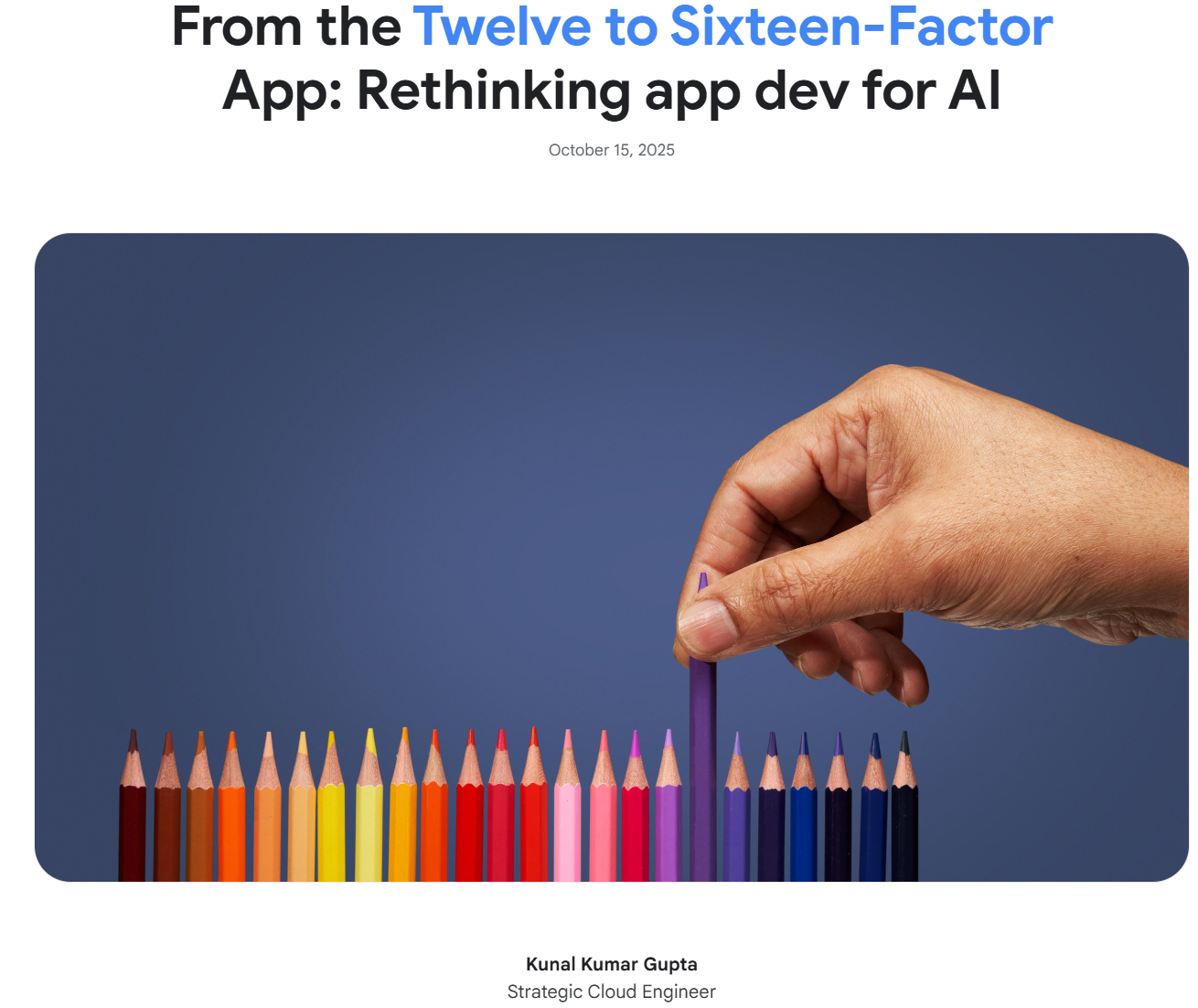
Google Cloud published an update to the 12-Factor framework in 2025, adding four new factors for AI-era applications: XIII: Prompts as code, XIV: State as a service, XV: Observability for non-determinism, and XVI: Trust & safety by design.

Technical Debt and Agentic AI Coding Tools

When shortcuts accumulate, they create drag. The next two sections name two patterns that will show up in your group projects if you are not looking for them, and then we look at how to use AI coding tools without making the problem worse.

Technical debt

Ward Cunningham coined the metaphor in 1992: shortcuts taken in code accrue interest over time, just like financial debt. Each shortcut saves a few minutes now but costs more later when you have to work around the consequences.

An imaginary scenario from your group project (1/3)

Week 2: TEAM MEMBER A realises they need to load the ChromaDB path in three different scripts. Instead of a function, they copy the same lines of code into each script.

# in the ingest.py
chroma_path = "data/chromadb"

# in the query.py
chroma_path = "data/chromadb"

# in the evaluate.py
chroma_path = "data/chromadb"

An imaginary scenario from your group project (2/3)

Week 4: A couple of weeks later, TEAM MEMBER B decides to reorganise the data folder. They change the .env and create a quick function to load the ChromaDB path.

# .env
CHROMA_PATH=data/interim/chromadb

# somewhere in the code
def get_chroma_path() -> str:
    return os.getenv("CHROMA_PATH", "data/interim/chromadb")

Then they update the path in ingest.py and query.py:

# in the ingest.py
chroma_path = get_chroma_path()

# in the query.py
chroma_path = get_chroma_path()

But because they weren’t working on evaluation, they forgot to update the path in evaluate.py, and it remains:

# in the evaluate.py
chroma_path = "data/chromadb"

An imaginary scenario from your group project (3/3)

Week 6: TEAM MEMBER C is running the evaluation script.

  • They change the chunking strategy several times but nothing changes the pipeline results.
  • TEAM MEMBER C can only conclude that optimising the chunking didn’t yield any improvement. They write up a report about it.
  • On the day of the deadline they realise the ChromaDB path is wrong.
  • Three hours of debugging later, they find the stale path in evaluate.py.
  • Two weeks of evaluation logs reference the wrong collection. Everything has to be re-validated.

Code smells

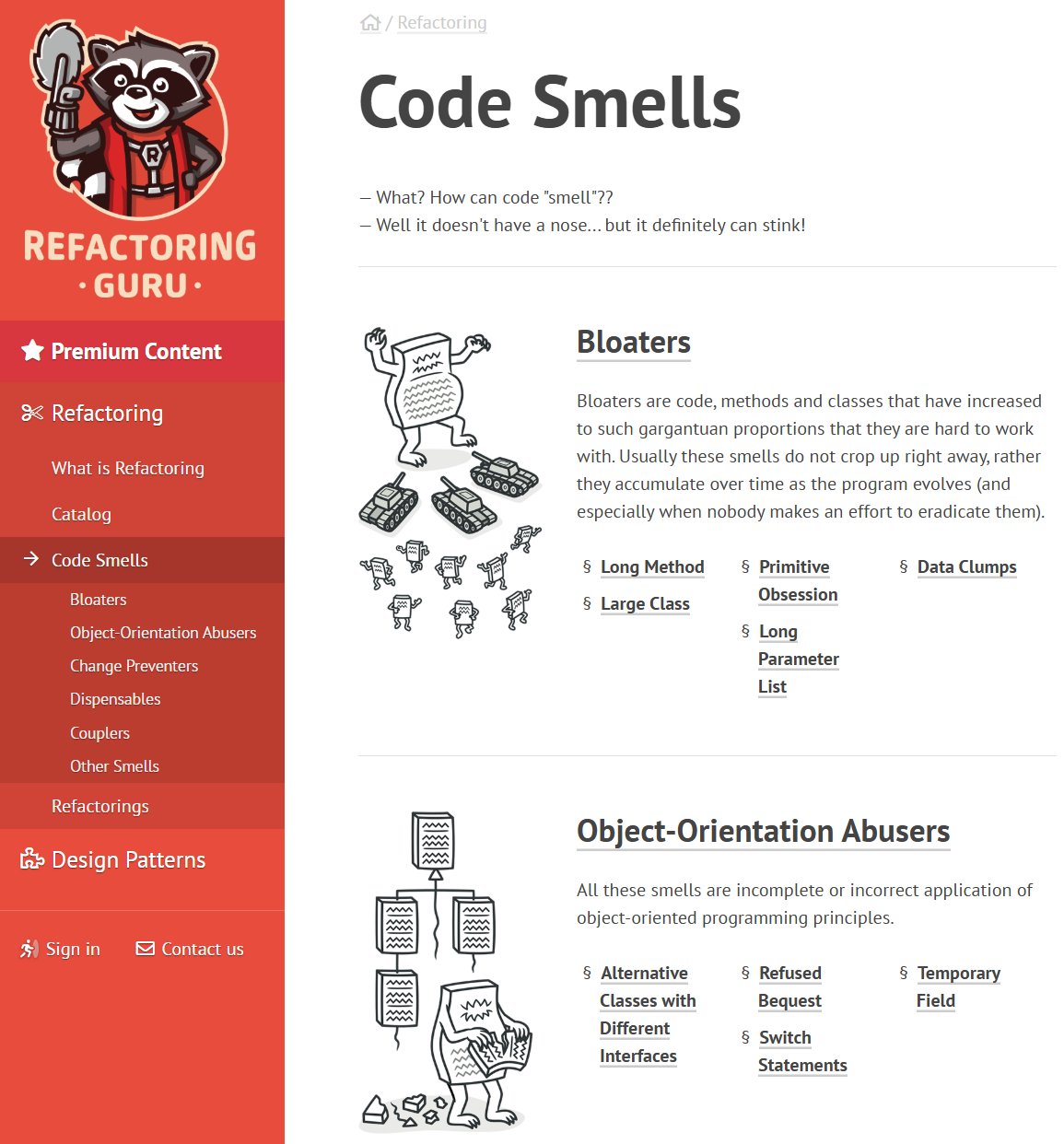
A code smell is a surface-level pattern in code that suggests a deeper structural problem. The term comes from Martin Fowler’s Refactoring (1999). The website Refactoring Guru is an excellent visual catalogue.

Three smells that are especially common in data pipeline projects:

  • Long Method: a function that does too many things. Hard to test, hard to reuse, hard to explain to a teammate.
  • Data Clumps: the same group of variables appears together in multiple function signatures. They probably belong in a class or dataclass.
  • Duplicate Code: the same logic copy-pasted into two places. When one copy is updated and the other is not, bugs appear.

If you notice a smell, and can’t fix it immediately, record it a GitHub Issue so it does not get lost. A smell that is documented is a conscious choice; a smell that is invisible is a trap.
Long Method: the problem

def run_pipeline(pdf_path, query):
    elements = partition_pdf(filename=str(pdf_path))
    texts = [el.text for el in elements
             if el.text.strip()]
    chunks, current = [], ""
    for t in texts:
        if len(current) + len(t) > 1000:
            chunks.append(current); current = t
        else:
            current += " " + t
    if current:
        chunks.append(current)
    model = SentenceTransformer("all-MiniLM-L6-v2")
    embs = model.encode(chunks,
                        normalize_embeddings=True)
    client = chromadb.PersistentClient("data/chromadb")
    coll = client.get_or_create_collection("docs")
    coll.upsert(
        ids=[f"c_{i}" for i in range(len(chunks))],
        documents=chunks,
        embeddings=embs.tolist(),
    )
    q_vec = model.encode(query,
                         normalize_embeddings=True)
    results = coll.query(
        query_embeddings=[q_vec.tolist()],
        n_results=5)
    return results["documents"][0]

Cast the first stone if you have never written code like this.

  • This function does five things: extract, chunk, embed, store, and query.
  • If the chunking logic has a bug, you cannot test it without running the entire pipeline.
  • If you want to re-query without re-embedding, you cannot.
  • Everyone who touches this function has to understand all five stages at once.
  • When someone adds a sixth step (reranking, generation), the function grows longer and harder to reason about.

The smell: a function you cannot describe in one sentence without using the word “and”.

Long Method: the fix

def extract_texts(pdf_path: Path) -> list[str]:
    elements = partition_pdf(filename=str(pdf_path))
    texts = [el.text for el in elements if el.text.strip()]
    return texts
def chunk_texts(texts: list[str], char_limit: int = 1000
) -> list[str]:
    chunks, current = [], ""
    for t in texts:
        if len(current) + len(t) > char_limit:
            chunks.append(current)
            current = t
        else:
            current += " " + t
    if current:
        chunks.append(current)
    return chunks
def store_embeddings(chunks: list[str], 
                     collection_name: str = "docs",
) -> chromadb.Collection:
    ...

Why this is better:

  • Each function does one thing, so you can test, reuse, and read it on its own.
  • You can call chunk_texts without running extraction, or store_embeddings without re-chunking.
  • Signatures and type hints state the function’s contract
    (Path in, list[str] out).
  • Reranking or generation becomes a new function, etc.

It’s ok for some functions to be long. What we don’t want is for them to do too many different things at once.

Data Clumps: the problem

def store_chunks(
    chunks, chroma_path, collection_name,
    embedding_model, distance_metric
):
    ...
def query_collection(
    query, chroma_path, collection_name,
    embedding_model, distance_metric, n_results
):
    ...
def evaluate_retrieval(
    questions, chroma_path, collection_name,
    embedding_model, distance_metric, reference_set
):
    ...
  • The same four parameters (chroma_path, collection_name, embedding_model, distance_metric) show up in every signature.
  • They move together because they mean one thing: which vector store you are using, and how.
  • Add a fifth field (say normalize_embeddings) and you must touch every function.

The smell: the same group of variables as arguments together, over and over.

Data Clumps: the fix

from dataclasses import dataclass

@dataclass
class RetrievalConfig:
    chroma_path: str = "data/chromadb"
    collection_name: str = "docs"
    embedding_model: str = "all-MiniLM-L6-v2"
    distance_metric: str = "cosine"
def store_chunks(
    chunks: list[str], config: RetrievalConfig
):
    ...

def query_collection(
    query: str, config: RetrievalConfig,
    n_results: int = 5,
):
    ...
def evaluate_retrieval(
    questions: list[str],
    config: RetrievalConfig,
    reference_set: dict,
):
    ...
  • One RetrievalConfig object holds the clump and now functions take config instead of four parallel arguments.
  • New settings become fields on the dataclass, not new parameters on every function. You get __init__, __repr__, and __eq__ by default. Read more about dataclasses in Python
  • Swap embedding model by building a different RetrievalConfig instance.

Duplicate Code: the problem

ingest.py

from sentence_transformers import (
    SentenceTransformer,
)

model = SentenceTransformer(
    "multi-qa-MiniLM-L6-cos-v1"
)
embeddings = model.encode(
    chunks,
    normalize_embeddings=True,
    show_progress_bar=True,
    batch_size=64,
)

query.py

from sentence_transformers import (
    SentenceTransformer,
)

model = SentenceTransformer(
    "multi-qa-MiniLM-L6-cos-v1"
)
query_vec = model.encode(
    query,
    normalize_embeddings=True,
    show_progress_bar=False,
    batch_size=1,
)

The model name, the normalize_embeddings=True flag, and the import are duplicated. If the team switches to a different embedding model, they have to update both files. If they update one and forget the other, query vectors and stored vectors use different models, and cosine similarity becomes meaningless.

Duplicate Code: the fix

embeddings.py (shared module)

from sentence_transformers import SentenceTransformer

_model = None

def get_model(name: str = "multi-qa-MiniLM-L6-cos-v1",
) -> SentenceTransformer:
    # Rare situation where 'global' is a good idea.
    global _model
    if _model is None or _model[0] != name:
        _model = (name, SentenceTransformer(name))
    return _model[1]

Then just use get_model() everywhere:

def encode(texts, show_progress=True):
    return get_model().encode(
        texts,
        normalize_embeddings=True,
        show_progress_bar=show_progress,
    )

This design pattern is similar to a design pattern called a singleton. It’s a way to ensure that only one instance of a object is created and shared across the program.

  • ingest.py and query.py both call embeddings.encode(...); model name, normalisation, and loading live in one module.
  • Change the default model in one place instead of hunting duplicate blocks.
  • get_model loads once per process when both ingestion and querying run in the same session (saves seconds on startup).
  • Read more about singletons in Python.

VS Code & GitHub Copilot for group projects
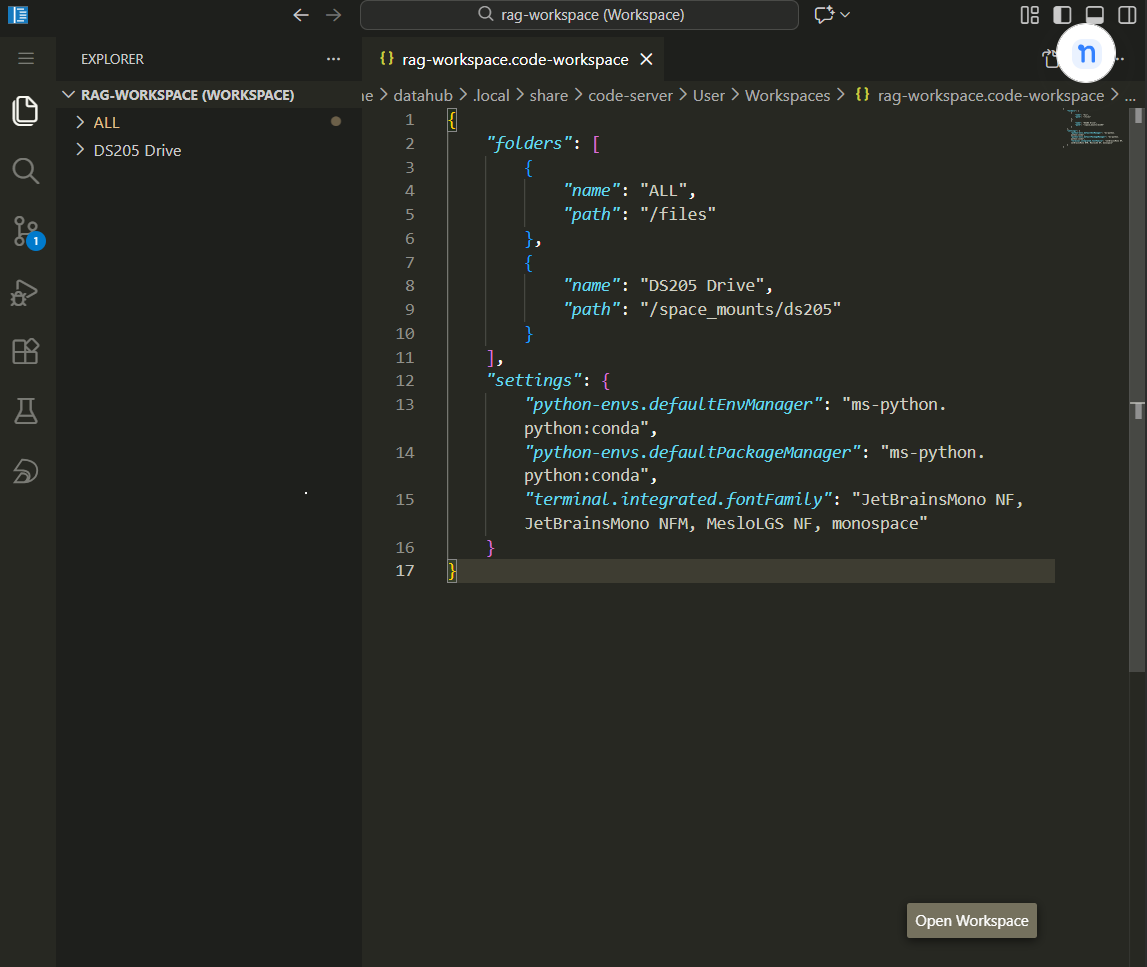
Workspaces

  • There is a difference between “opening a folder” in VS Code and “opening a workspace.”
  • A workspace (a .code-workspace file) lets you configure settings, extensions, and multi-root folders for the project. Copilot uses the workspace context to understand your project’s conventions.

🔗 Multi-root workspaces on VS Code documentation

Initialise GitHub Copilot

Copilot Instructions

  • The /init command in Copilot Chat reads the repository structure and generates a starter copilot-instructions.md.
  • Run this once when you set up the project, then curate the output so it accurately describes your conventions: which Python version, which linter, what the pipeline stages are, and what patterns to follow.
  • This file goes in .github/copilot-instructions.md or as AGENTS.md at the repository root.

Alternatively, use an interview workflow
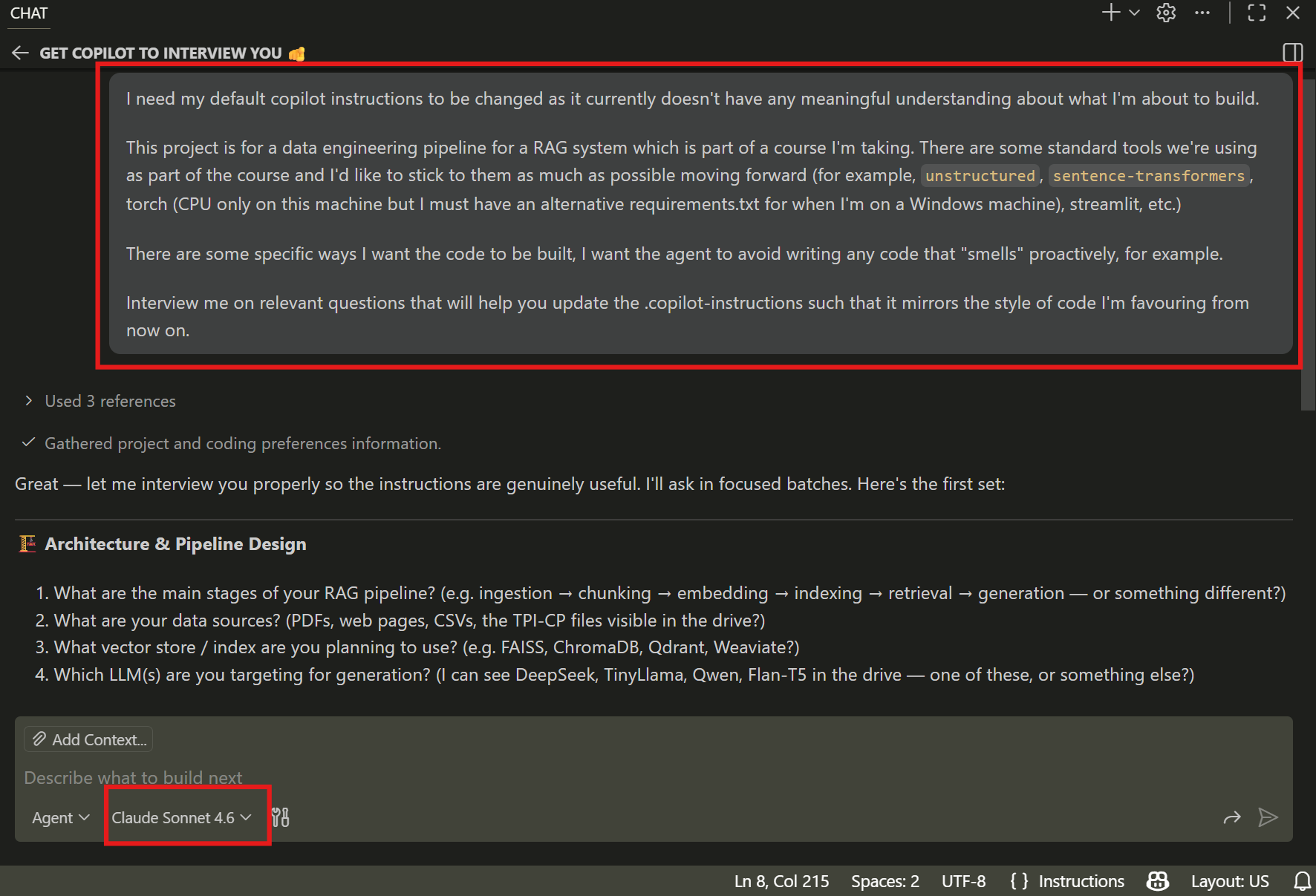
  • After running the /init command, give Copilot a bit of context and then ask it to interview you. It will ask about your tool stack, style preferences, testing conventions, and what to avoid.

  • Use a capable model (Claude Opus, Sonnet, GPT 5.4, etc.) to interview you.

If everyone shares the same file, and allow it to evolve over time, it becomes easier to maintain a consistent coding style across the team.

💡 If you’re using a different IDE, get it to point to the same file.

# Inside your CLAUDE.md file
Always read `.github/copilot-instructions.md` at 
the start of each session.

Build Scaffolding
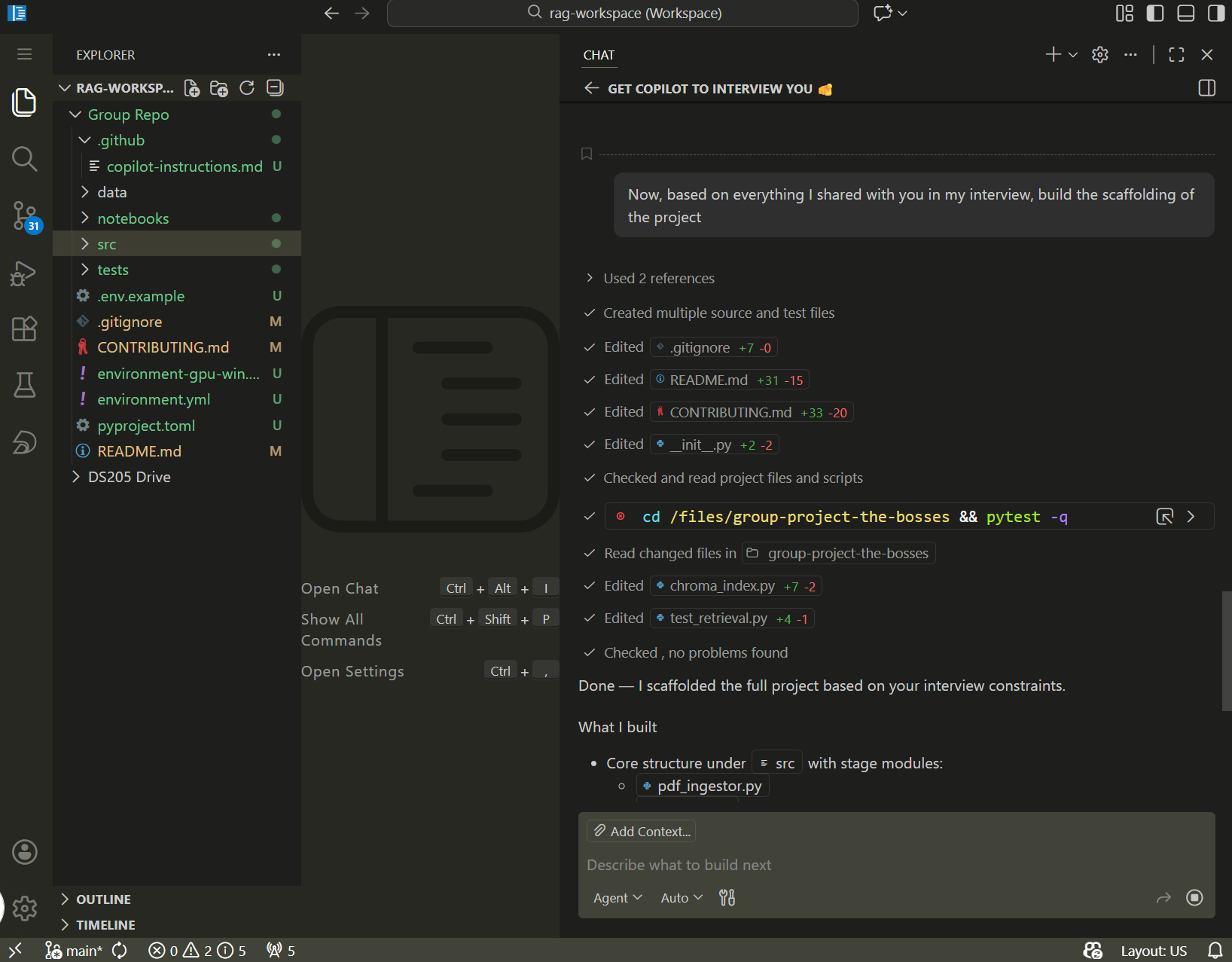
Plan, then execute

Say I want to build a Streamlit dashboard and I used Claude Web to brainstorm the interface and arrived at this:
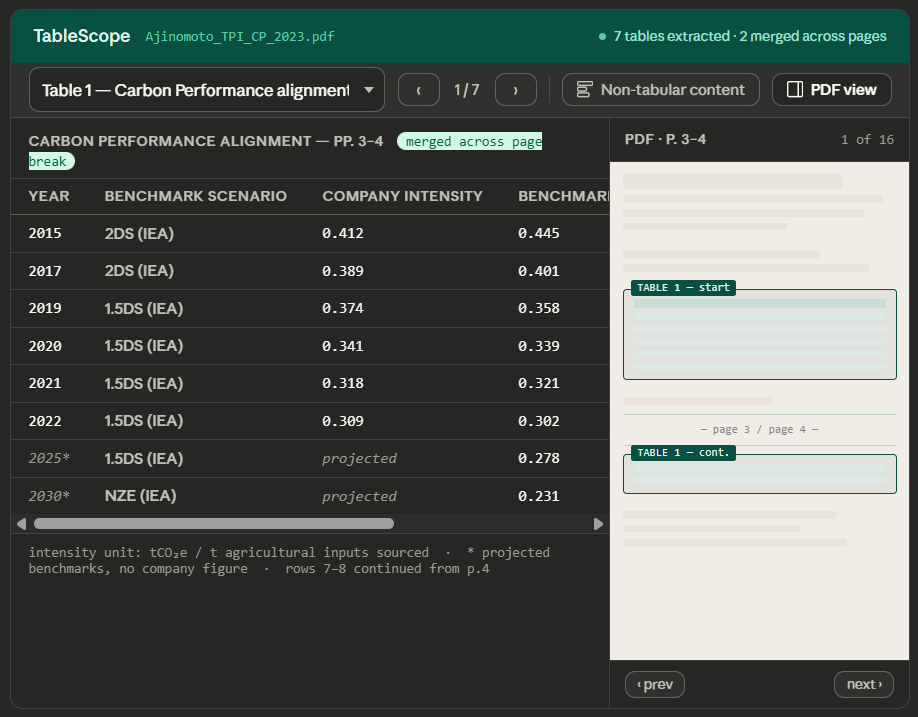
How would you use agentic AI coding to build it?

Plan first
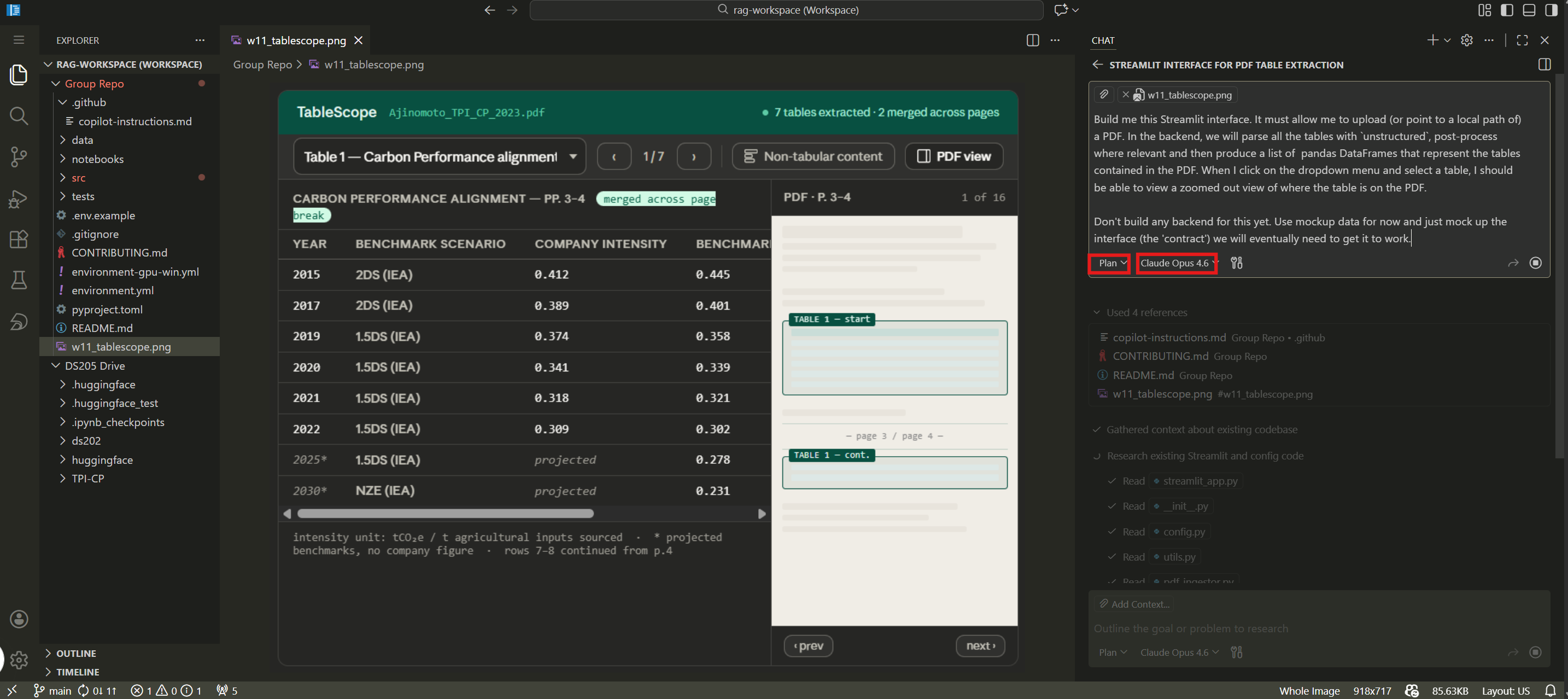
Only then execute the plan
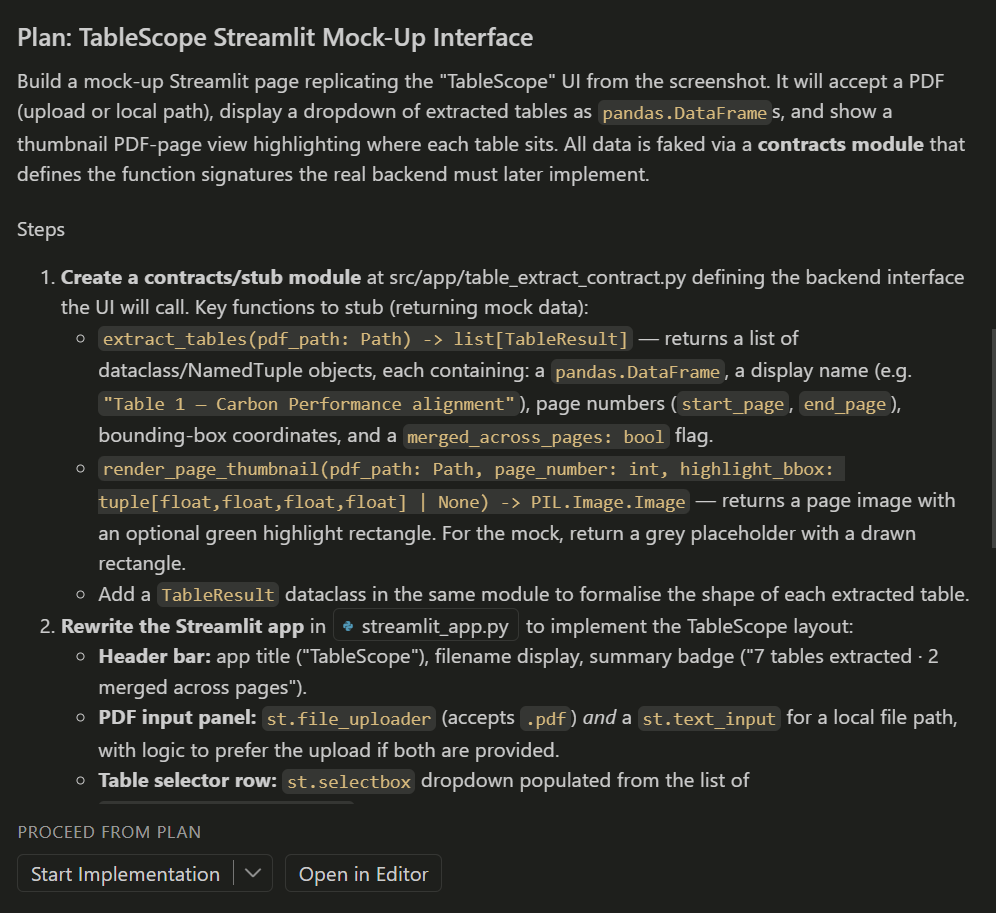
The pattern that works best:

  1. Describe the task to a capable model (Claude Opus, Sonnet, GPT 5.4, or similar) and ask it to produce a plan. Do not ask it to write code yet.
  2. Review the plan. Cut anything that is unnecessary or inconsistent with your project’s conventions.
  3. Ask a cheaper, faster model (Claude Haiku, GPT mini) to execute one step of the plan.
  4. Review the generated code. Remove anything you do not understand or do not need.

Writing code in 2026 is more like being a good manager than a solo software engineer. You delegate the tasks to the AI but you are still responsible for it to be “understanding” it correctly and producing the right code.

The ownership test

You are responsible for every line in your repository, regardless of how it got there.

Beyond asking yourself “does it work?” you should also ask “Do I understand why every part of this is here, and is every part necessary?” If you cannot answer yes to both, do not accept the suggestion. Rewrite it so you can. (or at least get the AI to contextualise and explainthe code for you)

Code you do not understand is technical debt with a high interest rate: it will break at the worst possible time and you will not know how to fix it.

Coffee Break ☕

After the break:

  • The six final project options
  • How we will grade them
  • Group formation and project bidding
  • Live demo: GitHub Project Board workflow

Final Projects

Six project options, all in partnership with the TPI Centre. Groups of 3-4. Worth 40% of the final grade. Due Tuesday 26 May 2026, 8pm. Everyone has read-only access to Sylvan Lutz’s CLEAR repository as a reference for patterns and tech stack choices.

The six projects

Code Project Groups
A Structured table extraction from TPI PDFs into a Streamlit app up to 3
B1 Benchmark: unstructured vs Markdown-first PDF ingestion 1-2
B2 Benchmark: chunking strategies x reranking (3x2 grid) 1-2
C Multi-step RAG vs single-shot generation (NEBIUS compute) 1
D ChromaDB vs pgvector refactoring with Docker 1
E Blue skies frontend for TPI data (any framework) 1
F Document discovery pipeline with GitHub Actions cron 1-2

There are 38 of you in the cohort, so there will be 9-12 groups depending on how you split up. You can form groups of 3-4 people.

⏳ Deadline 26 May 2026, 8pm
💎 Weight 40% of final grade
👥 Teams 3-4 students
📤 Submission GitHub Classroom

Projects vary from extensions to the ✍️ Problem Set 2 (B1, B2) to ambitious tools requiring new skills (D needs Docker, E needs frontend dev, F needs proper GitHub Actions). Choose based on your team’s strengths and what you want to learn.

Read the full specs on the Final Project page.

How we will grade

Three criteria:

Criterion Weight
Engineering Practice 35%
Reasoning and Evaluation 45%
Written Artefacts 20%

The 45% weighting on Reasoning and Evaluation is deliberate. A pipeline that half-works with a clear diagnosis of why it fails scores better than a pipeline that fully works but was assembled without understanding. Show your Recall@K numbers, your fact checks, your diagnosis of where things broke and what you tried to fix them.

Because everyone in the cohort is using agentic AI coding tools, adding new or complex features does not automatically impress. I will be looking for evidence of thoughtful planning, reproducible engineering, clear documentation, and genuine teamwork visible in the repository history.

What every group must ship:

  • README.md for users: how to install, run, and reproduce
  • CONTRIBUTING.md for developers: repo structure, dev setup, system dependencies
  • DECISIONS.md for design choices and alternatives considered
  • Typed Python, Ruff linting, logging module (not print)
  • GitHub Issues and/or a Project Board for task tracking

Engineering standards:

  • Curated requirements.txt OR environment.yml with pinned versions
    (better than I did)
  • .env.example with placeholder values
  • Tests where they matter (especially for Projects B1, B2, D, F)

Group formation

Right now, in this room:

  1. Choose a group name. This becomes your public repository name, so pick something you are happy to keep.

  2. Accept the GitHub Classroom assignment:

  1. Every member must join the team so their GitHub username appears on the Classroom roster. That is how I verify group membership.

  2. Submit ranked project preferences on the SharePoint Excel sheet (link shared now). One row per group: group name, first choice (A-F), second choice, optional third choice.

Preference columns:

Column What to put
Group name Name shown in GitHub Classroom
First choice Project code (A-F)
Second choice Another project code
Third choice Optional
Notes Optional context

For Project A, add your sector preference (Food / Utilities / Mining).

If anyone is not in a team by Wednesday morning, I will assign students manually.

What happens next

When What
Today Form groups, accept GitHub Classroom, submit project preferences
Wednesday morning I confirm project allocations based on preferences and PS1/PS2 performance
This week Set up your repo: README.md, CONTRIBUTING.md, DECISIONS.md, .github/copilot-instructions.md
Weeks 12-16 Build the project. Use GitHub Issues to track work. Meet with Sylvan if relevant.
Tuesday 26 May, 8pm Final submission via GitHub Classroom

Your first commit should be the group’s copilot-instructions.md or AGENTS.md. Before writing code, agree on conventions.

Live: GitHub Project Board and GitFlow

Live demo in GitHub (not slides)

I will create a GitHub Project board for a hypothetical group and walk through the workflow:

1. Create a Project board with columns: Backlog, In Progress, In Review, Done
2. Create four Issues representing real tasks from a final project
3. Create a branch from an Issue
4. Show a meaningful commit message vs a useless one
5. Open a PR that links to the Issue and describes the change
6. Review and merge

15 minutes demo, 5 minutes for questions about the workflow.

Resources

Software engineering principles

Git and collaboration

AI coding tools