Week 01
From Data to Insight: The Importance of Clean Data

DS105W – Data for Data Science

🗓️ 22 Jan 2026

Today’s Goals:

  • Intro: Meet the team
  • Logistics: Understand what this course is about
  • Intros: Tell us about yourselves
  • Discuss: the 📝 W01 Practice Exercise
  • New Content: about the data science workflow we will adopt in this course

Meet the DS105W Team!

Dr Jon
Cardoso-Silva

Course Leader

Tabtim
Duenger

Class Teacher

David-Ovidiu
Nae

Class Teacher

Sara
Luxmoore

Class Teacher

Kevin
Kittoe

Admin

Course Lead

Dr Jon Cardoso-Silva 📧
@jonjoncardoso
Assistant Professor (Education)
LSE Data Science Institute

Course Leader


Expertise & Current Projects

  • PhD in Computer Science
  • Experienced in software engineering, data science and data engineering
  • Investigating the impact of GenAI impact on higher education ( GENIAL project*)

🏆 Winner of LSESU Teaching Award for Feedback & Communication (2023)

Office Hours:
(Typically) Wednesdays 14:00-17:00
Book via StudentHub

Class Teachers

Tabtim Duenger

David-Ovidiu Nae

Sara Luxmoore

Class Teacher

Class Teacher

Class Teacher

Teaches:

  • CG1 (09:00-10:30)


FAW.4.01

Teaches:

  • CG2 (10:30-12:00) &
  • CG3 (12:00-13:30)

FAW.4.01

Teaches:

  • CG4 (15:00-16:30) &
  • CG5 (16:30-18:00)

FAW.4.01

Senior Data Scientist

Data Scientist

Research Officer

Administrative Support

Kevin Kittoe
Teaching & Assessment Administrator (DSI)

Admin

Contact 📧 DSI.ug@lse.ac.uk for:

  • Course access issues
  • Assignment submissions
  • Extension requests
  • Administrative queries

Key Information:

  • All extension requests must follow LSE’s extension policy
  • Email response time: 24-48 hours
  • Include ‘[DS105W]’ in email subject lines

Where will you be at the end of this course?

  • The value of student autonomy in this course
  • Example of group projects from previous years.

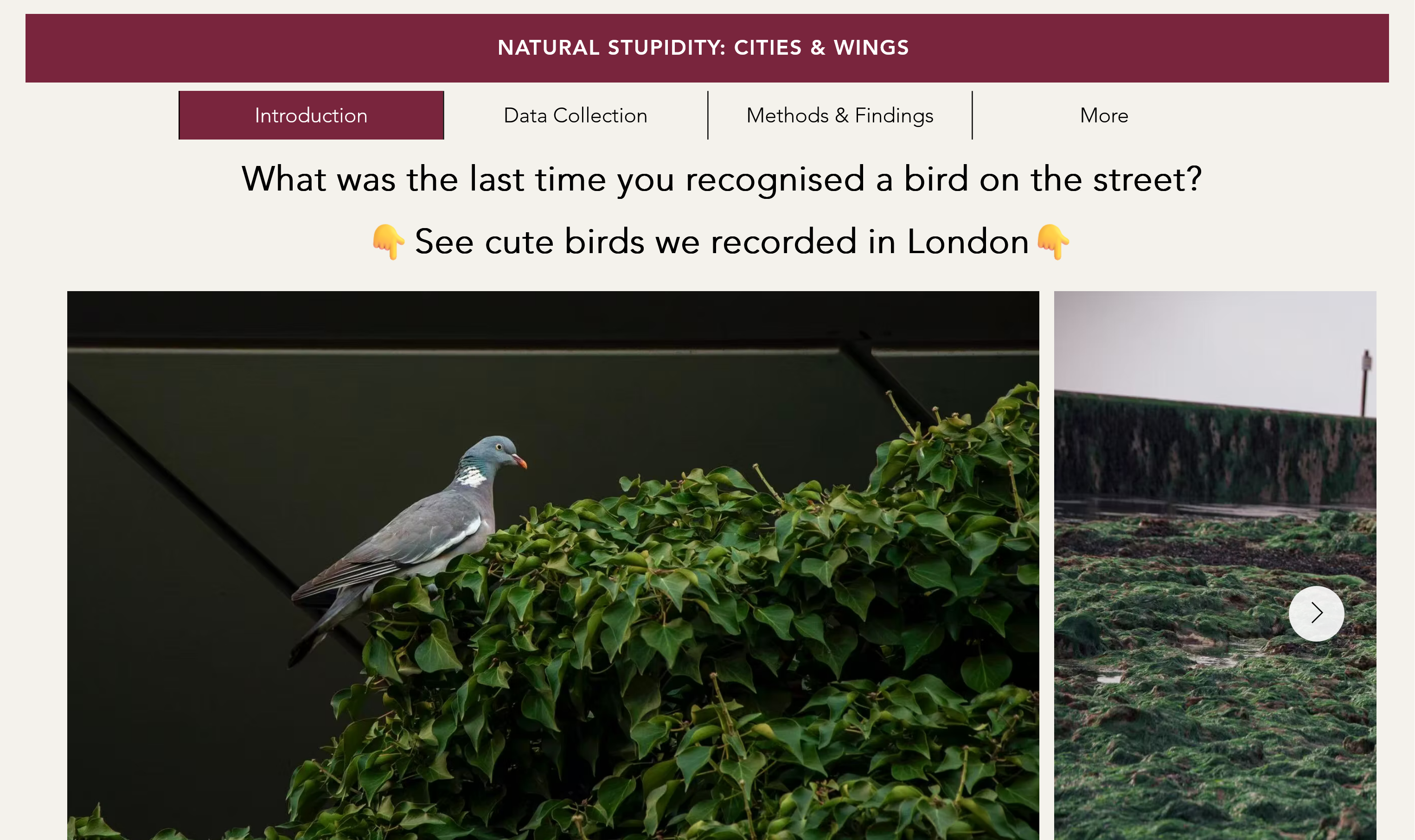
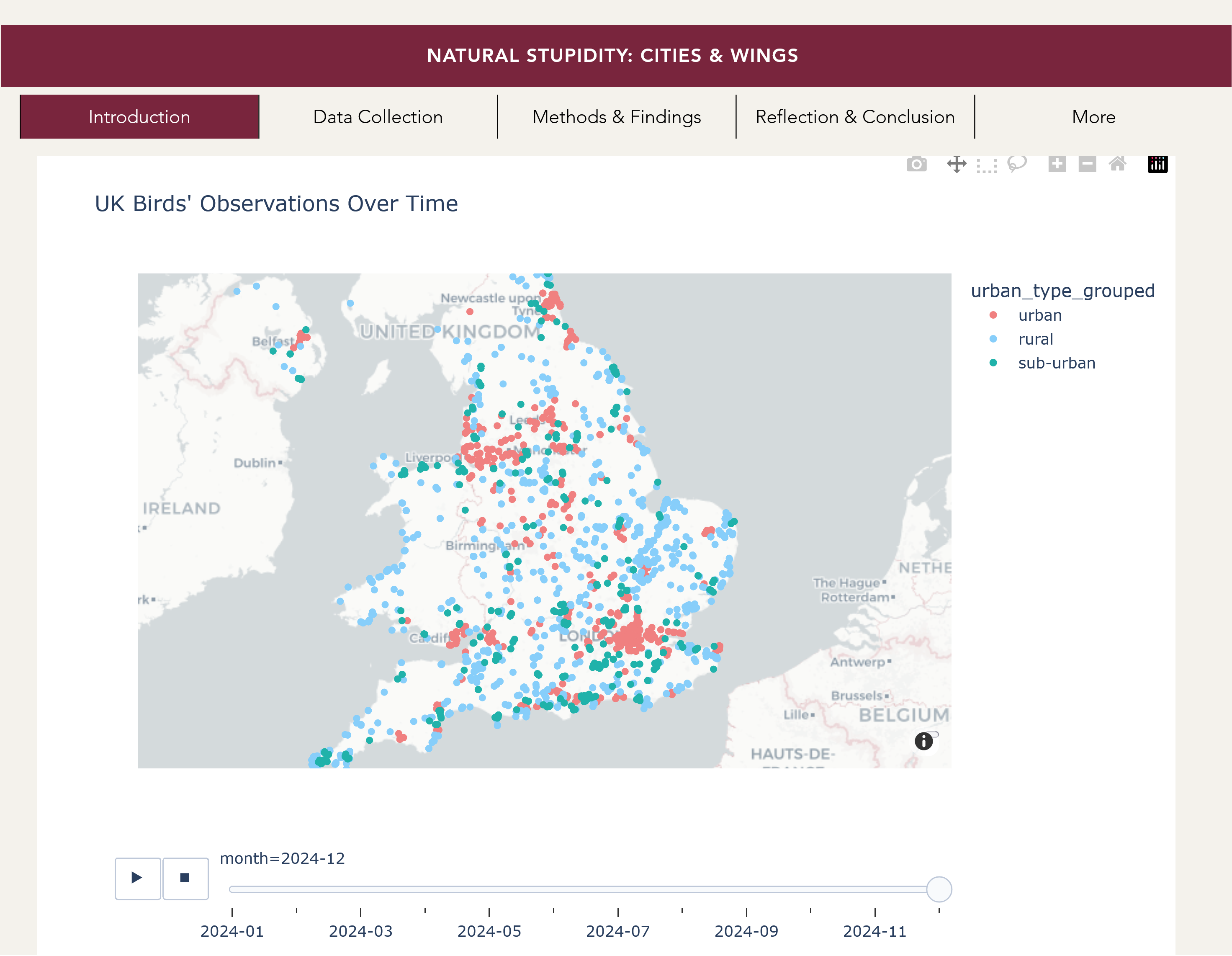
Bird Migration Project

Project from the 🌐 ‘Natural Stupidity’ group submitted in the 2024/25 Winter Term iteration of DS105.

Using data from 🐦 eBird amongst other sources, the group traced the prevalence of species migrating through the UK.
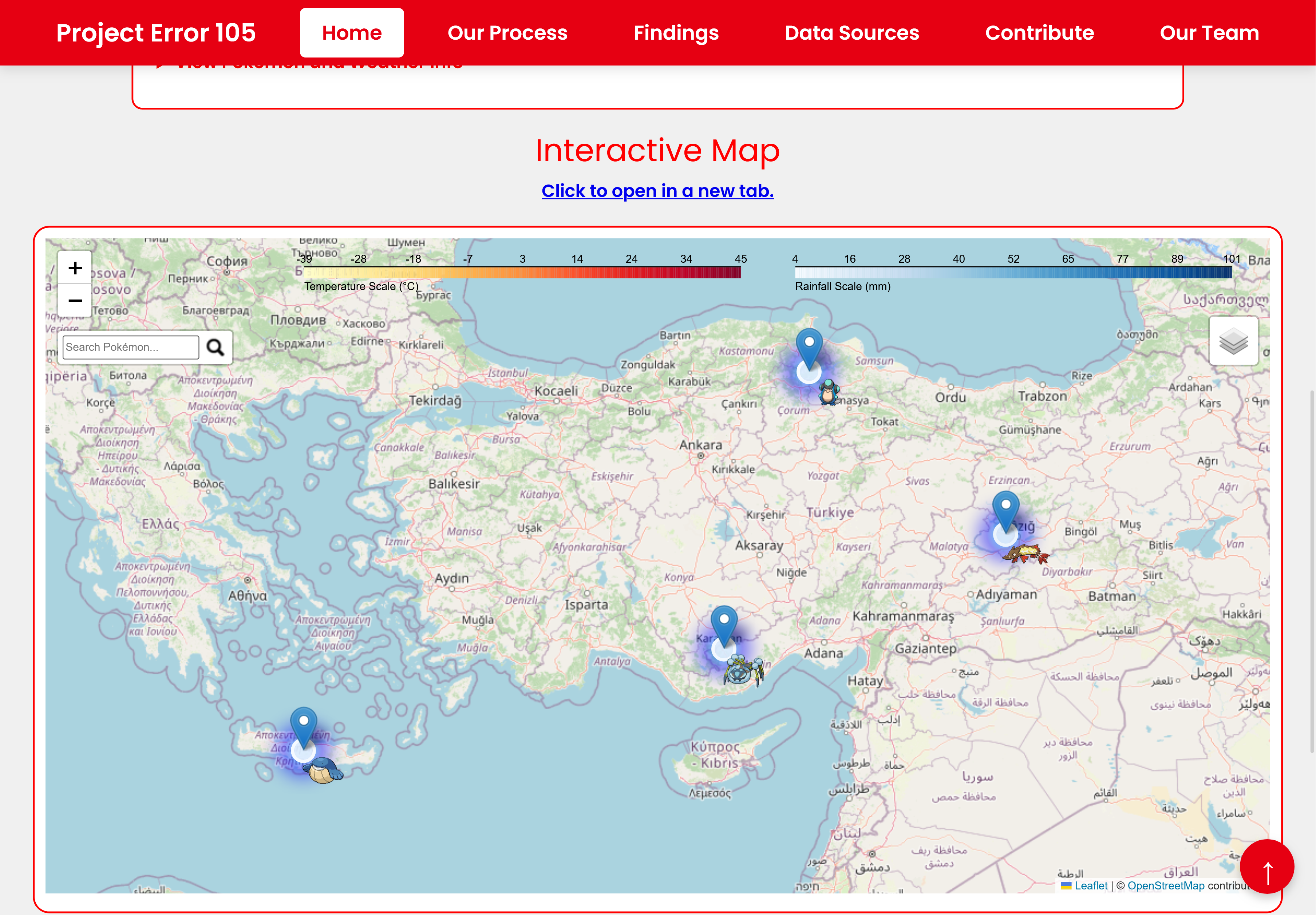
Pokemon Project

This team decided to answer this silly question: “If Pokemon were real, where would they live on Earth?”

See 🌐 their final website for more details.
How will you get there?

The DS105 way is to practise every week until you master the data science workflow below.
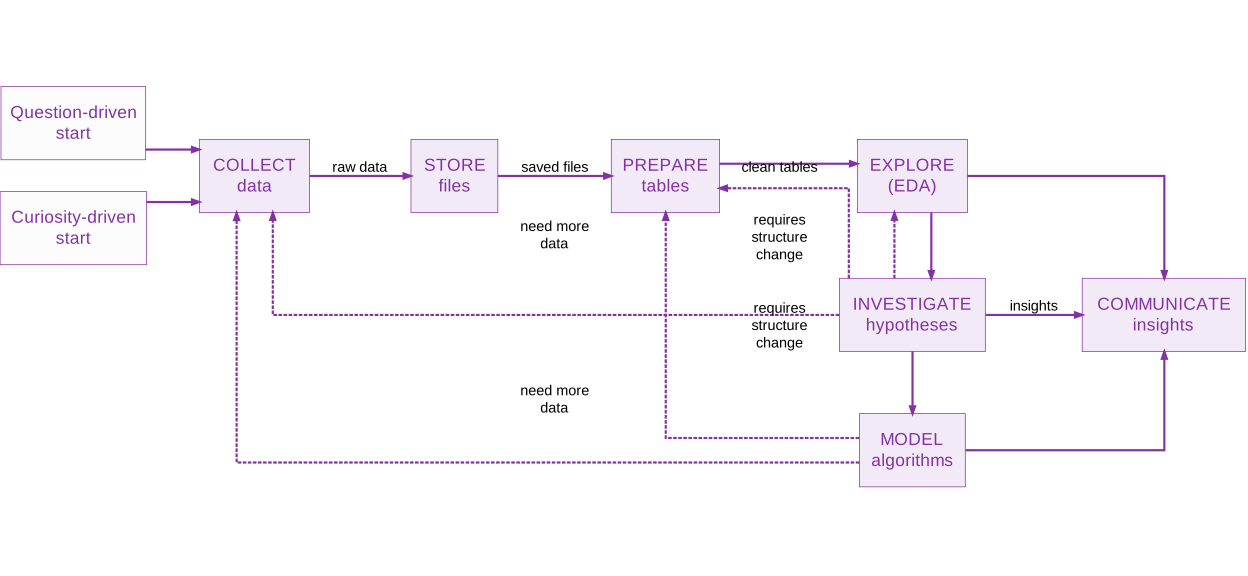
I will come back to this diagramlater.

DS105 ethos

  • You learn more if you are given some autonomy. In the first assignments, you have a strict set of instructions but as we progress, you will be given increasingly more freedom to choose the kind of project you want to work on.

DS105 ethos

  • You learn more if you are given some autonomy. In the first assignments, you have a strict set of instructions but as we progress, you will be given increasingly more freedom to choose the kind of project you want to work on.

  • We adopt a learn by doing approach. We want you to be spending more time practising (doing stuff) rather than reading about programming and data science.

DS105 ethos

  • You learn more if you are given some autonomy. In the first assignments, you have a strict set of instructions but as we progress, you will be given increasingly more freedom to choose the kind of project you want to work on.

  • We adopt a learn by doing approach. We want you to be spending more time practising (doing stuff) rather than reading about programming and data science.

  • We value good communication and collaboration. We like it when you feel comfortable to ask questions in front of the class or on the public channels Slack, and to see you working together in person or in our digital spaces!

✍️ Assessment Structure

We designed the assignments to be in line with the principles mentioned in the previous slides.

Here’s how you will be assessed ⏭️

Individual Work- 60% of final grade

📝

Practice Exercises (not graded*)

During Weeks 1-4, we (mostly) tell you what to do.

* Except for General Course and exchange students.

✍️

Mini Project I (20%)

You will be given a data source and a question we want you to answer from it. How you answer it is up to you (within constraints).

Released W04 | Due W06

✍️

Mini Project II (30%)

You will be given a data source but it is up to you to decide what question to answer from it.

Released W07 | Due W10

👤

Individual Contribution (10%)

Show us that you have made a meaningful contribution to the group project.
(see next slide)

Group Work - 40% of final grade

The moment of maximum freedom in this course is when you are working in a group.

For your 👥 Group Project, you choose which data source to use and what question to answer from it.

🗣️

Pitch Presentation (10%)

Convince us that you have an interesting idea for a project and good execution plan for the next couple of months.

Instructions released W10 |
Presentations Friday of W11

📦

Final Project (30%)

Document your group’s thinking, communicate findings to a technical as well as a wider audience.

Instructions released W11 |
Due late May 2026

What do the assignments measure?

Outcome Category What You’ll Master
Data Fundamentals & Python Mastery • Master data types, structures, and common formats (CSV, JSON, API responses)
• Apply Python and pandas to clean, reshape and transform raw data
• Identify and resolve common data quality issues
Analytical Workflows • Design and implement complete data analysis workflows
• Integrate data from multiple sources effectively
• Apply the data science pipeline from collection to communication
Database & SQL Skills • Understand database normalisation concepts
• Execute SQL queries for data retrieval and analysis
• Design schemas for multi-table data relationships
Visualisation & Critical Analysis • Create visualisations using seaborn with grammar-of-graphics principles
• Critically evaluate visualisations and avoid misleading representations
• Distinguish between correlation and causation in data patterns
Collaborative Development • Use Git and GitHub for version control and collaborative workflows
• Organise team-based data science projects
• Review and merge code systematically
Professional Communication • Understand markup languages fundamentals (HTML, Markdown)
• Create and maintain simple websites using HTML and CSS
• Craft clear, accurate and responsible data reports

📑 Key Information

📟 Communication & Support

  • Slack is our main point of contact. The invitation link will be available on Moodle.
  • 📧 Email: Reserved for formal requests (extensions, appeals)
  • 📅 Office Hours: Book via StudentHub
  • 🆘 Drop-in Support: COL.1.06 (DSI Studio) - Check current schedule

No Software Installation Required

All coding happens in the browser via Nuvolos Cloud with VS Code and Jupyter pre-configured.

Visit Nuvolos - First Time Access to get started.


📔 Full Course Details

Weekly schedule, assessment deadlines, and complete learning progression.

Let’s Meet You!

Join me on a Mentimeter activity to get to know you better.

Generative AI

How we approach AI chatbots like ChatGPT, Claude and Gemini in this course.

The course policy on AI

You can use AI chatbots like ChatGPT, Claude and Gemini freely in this course, including in assignments. There are no restrictions and we can even give feedback on your use of AI for learning.

Be IN CONTROL when using AI

⚠️ However, I do have a few warnings about this. Some are grounded on research I have been doing in this topic as part of the GENIAL project* and some are based on my personal experience.

  • GenAI is really powerful and cool but it’s only really useful (for learning) if you have the skills to judge its output.
    • I guarantee you: you can get ‘brain rot’ if you let AI do all the work for you.
  • When marking your work, we will give more weight to whatever we can see as evidence of your human judgement and personal learning growth. We value seeing your thinking process and critical judgement more than looking at an impressive-looking chart or table.

Pro-tip: Use the DS105 Claude tutor!
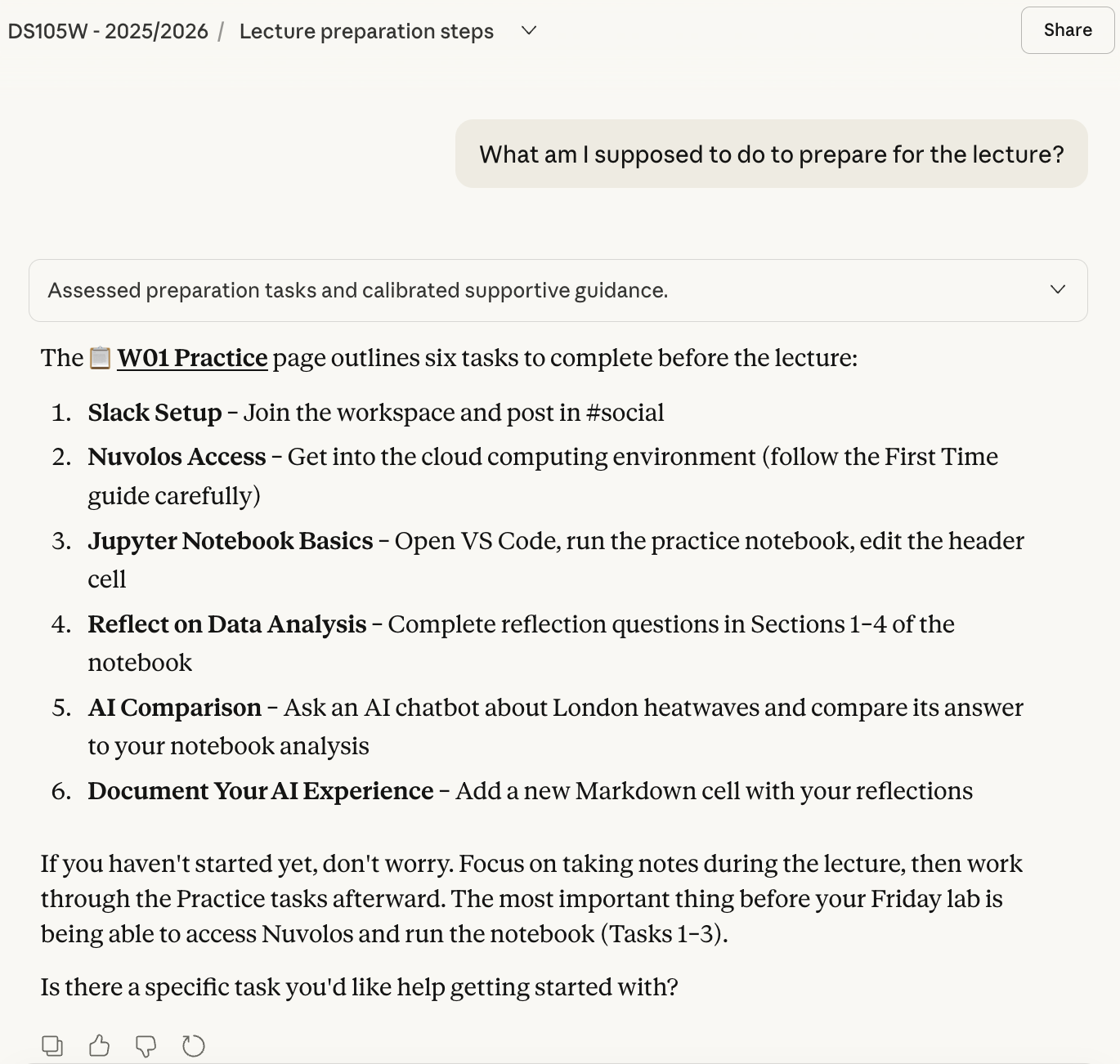
Tip: you can ask the DS105W Claude to give you a catch-up plan if you are behind.

I have set up a custom Claude for our course to help you use an AI that is more aligned with things we do in the course as opposed to generic (and boring) things you would find on the Internet.

👇 Students in the Autumn Term iteration of this course really loved using the DS105 Claude tutor. Ask around!

How to use the DS105 Claude tutor

Follow these instructions to get started:

  1. Make sure you have access to the LSE Claude Enterprise account.
  2. Go to the #announcements channel on Slack and look for my pinned message and give me your e-mail address so I can add you to the list of users who have access to the DS105 Claude tutor.

Research on GenAI and Education

  • I am one of LSE’s AI and Education Fellows!

    • The greatest ambition of this fellowship is to see how/whether GenAI can improve (for the better) the way we teach and learn in our disciplines - in my case, data science.
  • As part of the fellowship and as a continuation of my work on the GENIAL project, I will be collecting chatlog data you submit as part of your assignments for this course.

    • Whenever you start working on an assignment, I will ask that you keep a fresh chat window with your AI tool of choice (e.g. ChatGPT, Claude, Gemini, etc.) and share the link to it in your assignment repository.
    • There will be a consent form to sign so that we can use the data for research purposes. Of course you can say no if you don’t want to participate! (but I’d love to include your participation in the research 🥺)

🧘 Quick Break

Let’s take 10 minutes to stretch our legs, drink some water and come back refreshed.

When we return:

  • What is the data science workflow?
  • How should you think when doing an analysis?

The Data Science Workflow

Illustration of the typical steps involved

What raw data looks like

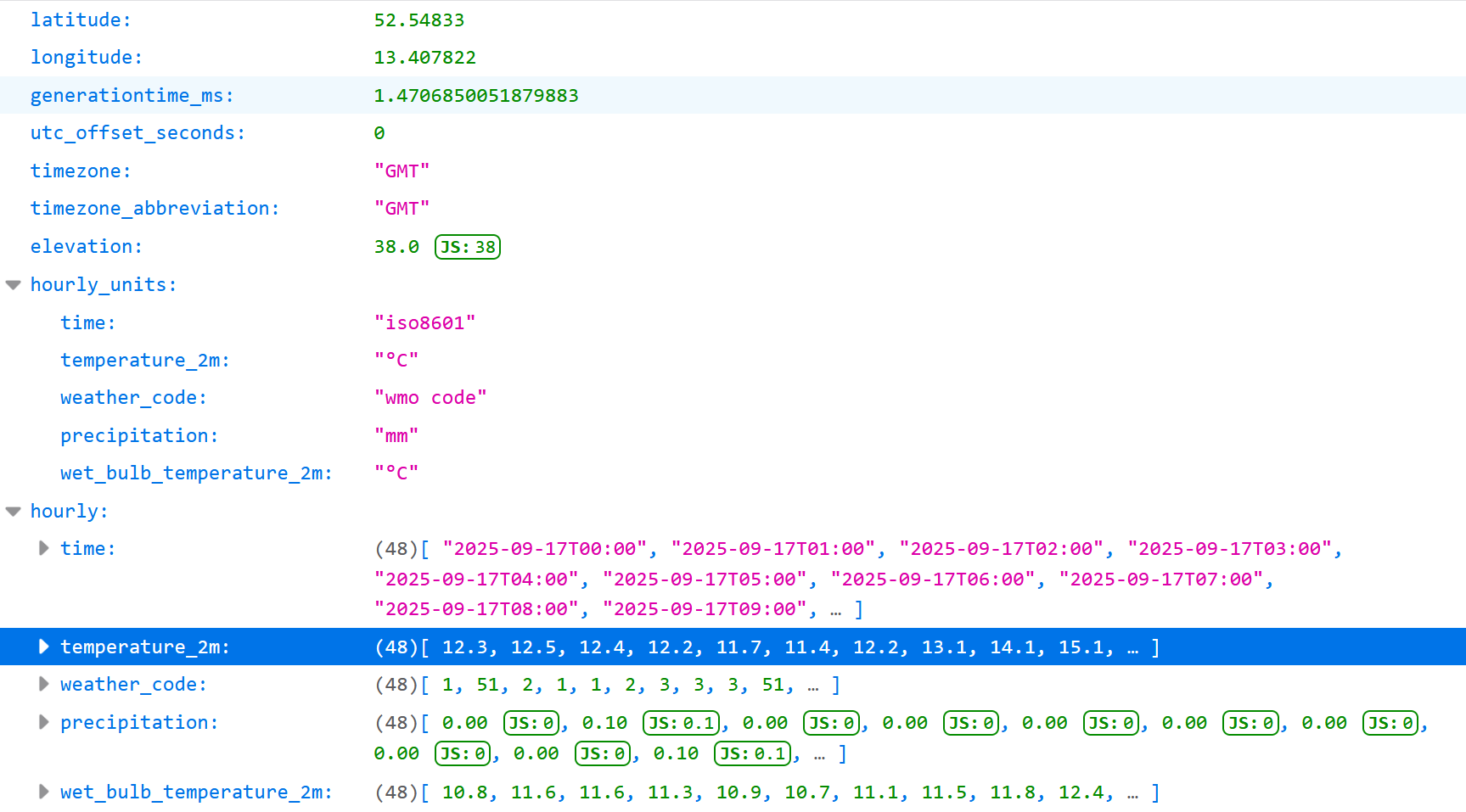
Once you start collecting data (very soon in this course), you will get data that might look like this:

{“latitude”:52.54833,“longitude”:13.407822,“generationtime_ms”:0.5619525909423828,“utc_offset_seconds”:0,“timezone”:“GMT”,“timezone_abbreviation”:“GMT”,“elevation”:38.0,“hourly_units”:{“time”:“iso8601”,“temperature_2m”:“°C”,“weather_code”:“wmo code”,“precipitation”:“mm”,“wet_bulb_temperature_2m”:“°C”},“hourly”:{“time”:[“2025-09-17T00:00”,“2025-09-17T01:00”,“2025-09-17T02:00”,“2025-09-17T03:00”,“2025-09-17T04:00”,“2025-09-17T05:00”,“2025-09-17T06:00”,“2025-09-17T07:00”,“2025-09-17T08:00”,“2025-09-17T09:00”,“2025-09-17T10:00”,“2025-09-17T11:00”,“2025-09-17T12:00”,“2025-09-17T13:00”,“2025-09-17T14:00”,“2025-09-17T15:00”,“2025-09-17T16:00”,“2025-09-17T17:00”,“2025-09-17T18:00”,“2025-09-17T19:00”,“2025-09-17T20:00”,“2025-09-17T21:00”,“2025-09-17T22:00”,“2025-09-17T23:00”,“2025-09-18T00:00”,“2025-09-18T01:00”,“2025-09-18T02:00”,“2025-09-18T03:00”,“2025-09-18T04:00”,“2025-09-18T05:00”,“2025-09-18T06:00”,“2025-09-18T07:00”,“2025-09-18T08:00”,“2025-09-18T09:00”,“2025-09-18T10:00”,“2025-09-18T11:00”,“2025-09-18T12:00”,“2025-09-18T13:00”,“2025-09-18T14:00”,“2025-09-18T15:00”,“2025-09-18T16:00”,“2025-09-18T17:00”,“2025-09-18T18:00”,“2025-09-18T19:00”,“2025-09-18T20:00”,“2025-09-18T21:00”,“2025-09-18T22:00”,“2025-09-18T23:00”],“temperature_2m”:[12.3,12.5,12.4,12.2,11.7,11.4,12.2,13.1,14.1,15.1,16.2,17.1,17.9,17.4,17.7,17.5,16.7,15.7,14.7,13.9,13.5,13.2,13.1,13.6,14.2,14.5,14.4,14.6,14.7,14.7,14.8,15.6,16.6,17.9,18.9,18.8,19.3,19.4,19.2,19.4,19.3,19.2,19.1,18.8,18.6,18.7,18.8,18.5],“weather_code”:[1,51,2,1,1,2,3,3,3,51,3,1,1,2,1,51,2,0,0,1,1,3,3,3,3,3,3,3,3,51,51,3,3,3,3,3,3,51,3,3,3,3,2,3,3,3,3,3],“precipitation”:[0.00,0.10,0.00,0.00,0.00,0.00,0.00,0.00,0.00,0.10,0.00,0.00,0.00,0.00,0.00,0.10,0.00,0.00,0.00,0.00,0.00,0.00,0.00,0.00,0.00,0.00,0.00,0.00,0.00,0.30,0.10,0.00,0.00,0.00,0.00,0.00,0.00,0.10,0.00,0.00,0.00,0.00,0.00,0.00,0.00,0.00,0.00,0.00],“wet_bulb_temperature_2m”:[10.8,11.6,11.6,11.3,10.9,10.7,11.1,11.5,11.8,12.4,12.9,12.9,12.9,12.6,12.6,12.6,12.6,12.2,11.7,11.5,11.1,10.9,10.7,11.1,11.5,12.1,12.2,12.5,12.8,13.1,13.4,14.0,14.8,15.6,16.1,16.1,16.5,16.9,16.9,16.9,16.9,16.7,16.8,16.6,16.6,16.7,16.6,16.4]}}

What raw data looks like

You will then learn that you have to impose a structure on this data to make working with it more manageable.
What ‘tidy data’ looks like

You will then discover that tables are often the best format to store data.

time temperature_2m weather_code precipitation wet_bulb_temperature_2m
0 2025-09-16T00:00 15.7 0 0 12.1
1 2025-09-16T01:00 15.4 0 0 11.4
2 2025-09-16T02:00 15.2 0 0 11.2
3 2025-09-16T03:00 14.7 0 0 10.9
4 2025-09-16T04:00 14.4 0 0 10.8
5 2025-09-16T05:00 14.1 1 0 10.8
6 2025-09-16T06:00 14.5 3 0 11.1
7 2025-09-16T07:00 15.2 3 0 11.4
8 2025-09-16T08:00 15.6 3 0 11.7
9 2025-09-16T09:00 16.2 3 0 12
10 2025-09-16T10:00 16.4 2 0 12.4
11 2025-09-16T11:00 17.2 51 0.1 12.6
12 2025-09-16T12:00 17.8 51 0.1 12.8
13 2025-09-16T13:00 17.4 51 0.1 13
14 2025-09-16T14:00 17.9 1 0 12.4
15 2025-09-16T15:00 17.8 0 0 12

What ‘tidy data’ allows you to do

You can now start to analyse the data.

  • Create summary statistics
  • Create visualisations
  • Run statistical tests (not covered in this course)
  • Build machine learning models (not covered in )

The 📝 W01 Practice Exercise

Speaking of ‘tidy data’ and data analysis, let’s do a quick recap of the work you’ve done in the 📝 W01 Practice Exercise

LIVE DEMO

Any Burning Questions? 🔥